Power Up Testing Efficiency by 40% in just 12 weeks. Join the Pilot Program

Your App URL Is All You Need
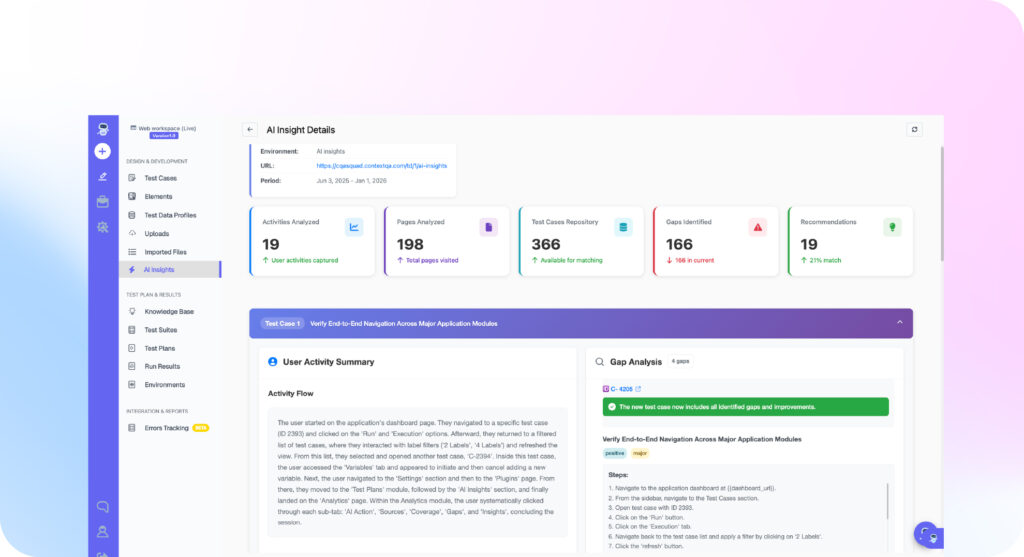
AI Insight analyzes real user sessions, maps every flow, finds the gaps, and generates production-ready test cases automatically. No prompts. No manual design. Minutes, not months. From URL to generated test cases in under 10 minutes.
Your Tests Cover Your Plan. Not Your Users.
Real users don’t follow your test plan – they click in unexpected sequences, combine features in unplanned ways, and uncover edge cases no QA engineer anticipated.
AI Insight closes the gap between what is tested and what is actually used – replacing guesswork with data.
Traditional Test
Design
QA manually writes tests based on assumptions, leaving coverage gaps invisible until production. It takes weeks to build meaningful, reliable test coverage.
AI Insight Test Generation
Based on real user behavior data AI auto-creates tests in minutes Gaps identified and filled proactively Minutes to generate, hours to review
From URL to Test Cases in 5 Steps
The system follows a predictable flow. Your team writes a prompt. ContextQA reads the inputs and produces tests that match the behavior described.
01.
Provide Your Application URL
Enter your URL, select date range and environment. No SDK, no code changes.
02.
AI Analyzes Real User Sessions
Maps every page visited, click path followed, and form submitted from actual usage data.
03.
Flow Identification and Mapping
Groups sessions into distinct user flows like login and checkout, ranked by frequency.
04.
Gap Analysis Against Existing Tests
Compares discovered flows against your test repo. Uncovered flows get flagged as critical gaps.
05.
Auto-Generate Missing Test Cases
Generates ready-to-run tests for every gap, following actual user journeys with realistic assertions.
Not Prompts. Not Recordings. Real User Intelligence.
ContextQA offers multiple ways to create tests: prompts, AI test generation, and manual configuration. AI Insight is fundamentally different from all of them because it requires zero input about what to test. It discovers what to test from how your users actually behave.
| Feature | Prompt-Based | AI Test Generation | AI Insight |
|---|---|---|---|
| Input required | You describe what to test | AI scans your app's UI | ✦ Just a URL and date range |
| Test basis | Your instructions | Application structure | ✦ Actual user behavior |
| Coverage strategy | Tests what you ask for | Tests what it finds in the UI | ✦ Tests what users actually do |
| Gap detection | No (you decide coverage) | Partial (structural gaps) | ✦ Yes (compares usage vs tests) |
| Priority basis | Your judgment | Application complexity | ✦ Real user traffic volume |
| Best for | Specific scenarios you know | Broad coverage of visible UI | ✦ Closing the gap between tested and used |
Trusted by leading engineering and QA teams






What AI Insight Does for Your QA Team
From journey mapping to gap detection and auto-generation, AI Insight turns real user behavior into actionable test coverage. No guesswork. No blind spots.

User Journey Mapping
Maps every page, click, and form interaction into distinct journeys. See how users actually use your product.
Auto-Test Case Generation
Creates ready-to-run test cases for every gap found. Includes navigation, inputs, and assertions built in.
Coverage Gap Detection
Compares real user flows against your test suite. Flags high-traffic paths with zero coverage instantly.
Continuous Discovery
Detects new user patterns on schedule as behavior shifts. Coverage evolves with your users automatically.
Built for Every Team That Cares About Quality
Whether you’re building coverage from scratch, fixing blind spots, or answering tough questions from leadership – AI Insight gives every team the data they need to test smarter.
QA Teams Starting From Low Coverage
Build a meaningful test suite in days, not months. If your automated coverage is below 40%, stop guessing what to test. AI Insight analyzes real user behavior and generates a prioritized test suite covering the flows that matter most – automatically.
QA Teams With Existing Suites That Have Blind Spots
Find the gaps your suite can’t see. Even at 60%+ coverage, blind spots exist. AI Insight surfaces the high-traffic user flows that are completely untested – the exact flows producing your production bugs. No more guessing where the gaps are.
Product and Engineering Leadership
Turn “I think we’re covered” into “Here’s the data.” When leadership asks “Are we testing what our users actually do?” AI Insight gives you a real answer. A live coverage map showing tested vs. untested user flows, ranked by traffic volume.
When AI Insight Makes the Biggest Impact
Not sure when to run AI Insight? Here are four scenarios where it delivers the most value fast.
After a major feature launch
Users interact with new features in unexpected ways. Run AI Insight on the last 7 days to discover real usage patterns and generate tests that match how users actually behave.
Before a big release
Run AI Insight on 30 days of production usage. Find high-traffic flows with no test coverage. Generate and run those tests before release to protect the paths that matter most.
When inheriting a legacy application
Test suite is outdated or missing. AI Insight gives you a data-driven starting point: tests based on what real users do, prioritized by traffic volume. Coverage in days, not months.
Continuous Discovery
User behavior shifts over time. AI Insight runs continuously to detect new patterns and generate tests for newly discovered flows. Coverage evolves with your users, not just your release cycle.
AI-POWERED QA INTELLIGENCE
Stop Guessing. Start Testing What Matters.
AI Insight shows you exactly where your test coverage falls short, then fixes it automatically. See it on your own app.
FAQs
Our Customers Also Ask
What is AI Insight?
AI Insight is a ContextQA feature that automatically generates test cases by analyzing real user behavior. You provide an application URL, date range, and environment. The AI maps actual user journeys, identifies gaps in your existing test suite, and creates missing test cases in minutes.
How is AI Insight different from AI test generation?
AI test generation scans your application's UI to create tests based on what it finds structurally. AI Insight creates tests based on how real users actually use your application. The difference is the data source: application structure versus actual user behavior.
Do I need to install anything to use AI Insight?
No. You provide your application URL, select a date range, and choose the environment. No SDK, no code changes, and no agent installation required.
What user data does AI Insight access?
AI Insight analyzes page visit patterns, navigation sequences, and interaction flows. It does not access or store personal user data, credentials, or form input values. The analysis focuses on behavioral patterns, not individual user identities.
How quickly does AI Insight generate test cases?
For most applications, AI Insight completes analysis and generates test cases within minutes. Larger applications with more complex user flows may take slightly longer, but results are typically available in a single session.
Can I review and edit the generated tests before running them?
Yes. Every generated test case is visible, editable, and reviewable before execution. You can modify steps, add assertions, adjust priority, or discard tests that are not relevant. AI Insight provides the starting point. Your team has full control over the final suite.
Does AI Insight work with existing test suites?
Yes. AI Insight compares discovered user flows against your existing test repository. It only suggests tests for flows that are not already covered. Your existing tests are not duplicated or replaced.
How often should I run AI Insight?
We recommend running AI Insight after major feature launches, before significant releases, and on a quarterly schedule to capture shifts in user behavior. You can also run it on-demand anytime you want to audit your coverage against real usage.