Power Up Testing Efficiency by 40% in just 12 weeks. Join the Pilot Program

Load Testing Just Got Easy With AI Performance Testing Tools
Built for real-world validation, ContextQA simulates realistic load and traces bottlenecks across your entire stack. Load testing finally keeps pace with your release velocity.
Trusted by leading engineering and QA teams




Stronger prompts lead to stronger tests.
Get faster cycles, cleaner builds, and trustworthy results when you use software testing with our context-aware AI testing platform.
%
Faster triage
%
Maintenance reduction
0
%
Flake rate
You Don’t Need an Engineering Degree for Load Testing Anymore
Performance shapes user trust, revenue, and reliability. But legacy load testing is slow, script-heavy, and hard to scale when you don’t have 24/7 access to specialists.
ContextQA provides no-code load testing, realistic traffic simulation, and deep performance insight so teams can validate speed and stability continuously. AI performance testing tools give you production-grade results without the complexity.

Stronger Performance Insight, Lighter Workload
AI tools for performance testing give teams the coverage they need without the scripting burden or maintenance overhead.
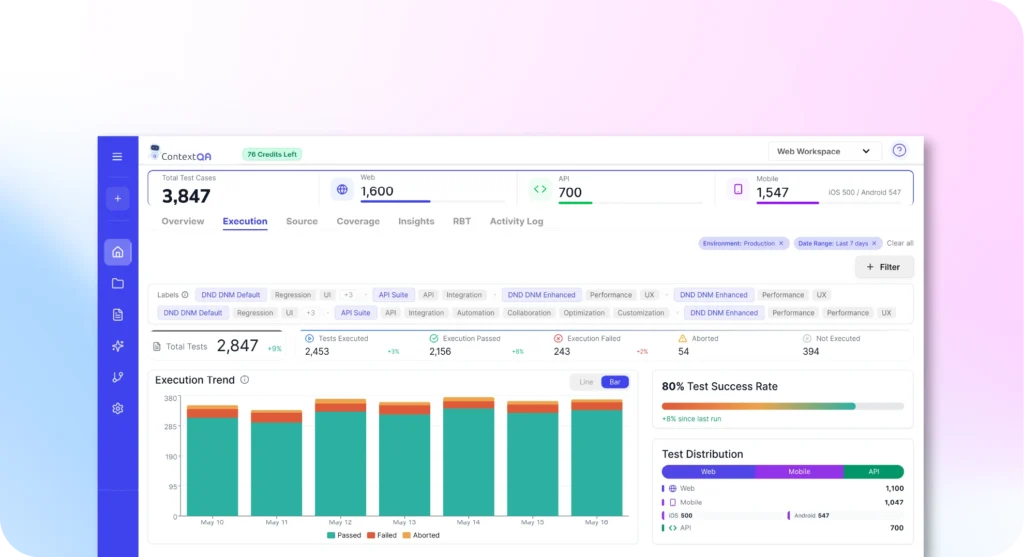
Build Load Tests Visually
Design complex performance scenarios through a visual interface instead of writing scripts. Our AI performance testing tool translates your test logic into executable load scenarios automatically.
Mirror Real User Behavior at Scale
Model traffic patterns that reflect actual user personas, geographic distribution, and network conditions. Our performance testing AI simulates realistic load, not synthetic patterns.
Understand Bottlenecks Across Your Stack
See when the system slows down and why. Our AI-based performance testing traces issues across backend services, API endpoints, and UI rendering layers.
Test Full-Stack Performance Together
Combine UI and API load testing for complete responsiveness insight. Performance testing using AI validates both browser rendering and backend capacity in unified scenarios.
Prevent Regressions Before Production
Run continuous load tests in CI/CD pipelines and catch performance degradation during builds. AI for performance testing blocks releases that fail SLA thresholds automatically.
How AI Validates Performance at Scale
ContextQA executes realistic load, captures telemetry in real time, and traces bottlenecks to root causes automatically.
01
Define User Load and Expectations
Teams design load scenarios visually by specifying user flows, traffic patterns, and performance thresholds.
02
Generate Realistic Load Automatically
ConextQA generates realistic traffic across APIs, UIs, and browser sessions while measuring response times, throughput, and resource consumption.
03
See Where Performance Degrades
Performance telemetry gets captured in real time and compared against baselines. The system identifies when metrics degrade and traces issues to specific components.
04
Get Actionable Reports
Results highlight regressions with clear before-and-after comparisons. Teams see which changes introduced slowdowns and how performance trends across builds.
Everything Needed for Salesforce Validation
AI performance testing tools shouldn’t require weeks of setup or specialized expertise. ContextQA delivers production-grade load testing through an accessible platform.
No-code scenario design with drag-and-drop logic
HTTP/S, REST API, and real-browser UI load testing
Configurable load profiles (ramp-up, constant, spike, random)
Concurrent user simulation with geographic distribution
Multi-persona scenarios with varied pacing and behavior
Network latency and bandwidth throttling
Real-time metrics (response time, throughput, error rate, latency)
Backend telemetry (CPU, memory, database calls)
Threshold alerts and SLA validation
Compare performance across builds and branches
CI/CD integration (Jenkins, GitHub, GitLab, Azure DevOps)
Export metrics to Grafana, ELK, and custom dashboards
Reuse functional tests as performance scenarios
How Different Teams Use AI Performance Testing Tools
Performance matters to every team. ContextQA delivers role-specific insight without forcing teams to change how they work.
QA Teams
QA teams design load tests visually and detect degradations early. Performance regressions get caught before late-cycle surprises slow releases.
Backend Engineering
Backend engineers see which endpoints slow down under stress and how resources behave at peak load. Debugging cycles shrink with clear performance telemetry.
Front-End and Web Teams
Front-end teams validate UI performance under real browser load. AI performance testing tools reveal rendering delays and API-driven slowdowns that affect user experience.
DevOps and SRE Teams
DevOps teams run continuous performance checks in CI/CD that flag regressions automatically. SLAs stay protected without manual load test execution.
Product and Release Teams
Product teams compare performance across builds to understand when features introduce risk. Predictable performance data strengthens release confidence.
Why Teams Choose ContextQA for Performance Testing
ContextQA unifies no-code creation, realistic simulation, and deep system insight into one performance testing workflow.
Deterministic
Execution
Performance runs produce consistent, repeatable results without script variability.
Agentic Reasoning Across System Layers
AI interprets telemetry and highlights root causes across backend, API, and UI layers.
Enterprise
Readiness
Role-based access, environment controls, and secure integrations built in.
Compliance and
Governance
Full audit trails and test histories for compliance requirements.
Full-Stack
Visibility
Measure performance across APIs, UI, and backend in one test.
How AI Testing Platforms for Salesforce Automation Compare
| Capability | ContextQA | mabl | Testim |
|---|---|---|---|
| No-code performance test creation | Yes – visual scenarios without scripting | Partial – low-code setup, not purpose-built for load testing | No |
| Realistic user behavior simulation | Yes – models personas, pacing, geography, and network conditions | Partial – basic concurrency, limited realism | No |
| Unified UI and API load testing | Yes – browser and backend capacity tested together | Partial – API and UI tested separately | Partial – possible via Selenium/grid, not native |
| Full-stack bottleneck visibility | Yes – traces issues across UI, APIs, services, and databases | Partial – high-level performance indicators | No |
| Performance regression detection across builds | Yes – automated comparisons with baselines | Partial – trends available, manual interpretation | No |
| CI/CD-integrated load testing | Yes – automated execution with SLA gating | Partial – execution supported, no performance gating | Partial – execution possible, no load orchestration |
| Deterministic, repeatable performance results | Yes – consistent runs without script variability | Partial – dependent on test configuration | Partial – dependent on external tooling |
| Suitability for continuous performance validation | Yes – designed for frequent, automated load testing | Partial – better for scheduled checks | No |
testing expert
Ready to make every team member a testing expert?
ContextQA keeps your applications fast by simulating realistic load, detecting bottlenecks early, and validating continuously across every build. See how AI-driven load testing fits into your release process.
FAQs
Frequently Asked Questions
Do I need scripting experience to create performance tests?
No. AI performance testing tools let teams design load scenarios through a visual interface without writing code. Teams specify user flows, traffic patterns, and thresholds using drag-and-drop logic. The platform translates visual scenarios into executable performance tests automatically.
Can ContextQA simulate both API and UI-level load?
Yes. Performance testing AI validates both API endpoints and real-browser UI interactions in the same test scenario. Teams test how backend services and frontend rendering perform together under realistic load conditions, revealing bottlenecks that isolated API or UI tests might miss.
How does the platform identify performance bottlenecks?
AI-based performance testing captures telemetry across backend services, API calls, database queries, and UI rendering. The system analyzes response times, resource consumption, and error rates to trace slowdowns to specific components. Root cause analysis pinpoints whether issues stem from database queries, API latency, or frontend rendering.
Can performance tests run automatically in CI/CD?
Yes. AI for performance testing integrates with Jenkins, GitHub Actions, GitLab CI, and Azure DevOps. Load tests execute automatically on builds, pull requests, or scheduled intervals. Failing performance thresholds can block deployments based on configured SLA criteria.
Does ContextQA support geographically distributed load?
Yes. Performance testing using AI simulates traffic from multiple geographic regions with configurable network latency and bandwidth constraints. Teams validate how applications perform for users in different locations and under varied network conditions.
How do teams compare performance across builds?
AI performance testing tools maintain baseline metrics and trend data across test runs. Teams compare response times, throughput, and resource consumption between builds to identify when changes introduce performance regressions. Historical data shows how performance evolves over releases.
Can thresholds and SLAs be enforced automatically?
Yes. Teams define performance thresholds for response time, error rate, throughput, and resource consumption. Performance testing AI flags violations automatically and can block CI/CD pipelines when SLAs aren't met. Alert notifications keep teams informed of performance degradation in real time.