
TL;DR: The best test management tool depends on what your team actually needs. If you want AI powered test management with execution built in, ContextQA combines test management, AI analytics, and automation in one platform. If you need standalone test management for manual QA workflows, tools like TestRail or Zephyr Scale are purpose built for that. If you are running an open source stack and want free options, TestLink or Kiwi TCMS are mature choices. This guide compares 15 tools across features, pricing, and team fit so you can skip the vendor demos and narrow your shortlist first.
Definition: Test Management Tool Software that helps QA teams plan, organize, track, and report on testing activities. Core functions include test case creation and storage, test plan organization, test execution tracking, defect linking, requirements traceability, and reporting. Modern test management tools increasingly integrate with automation platforms, CI/CD pipelines, and project management systems. The market is splitting into two categories: standalone test management tools (focused on organizing and tracking) and integrated platforms (combining management with AI powered execution, analytics, and automation).

Quick Answers:
What is the best test management tool in 2026? For integrated AI management and execution: ContextQA. For standalone test management: TestRail. For Jira native teams: Zephyr Scale or Xray. For open source: TestLink. For enterprise with existing Tricentis: qTest. The best choice depends on whether you need test management only or management plus execution.
How much do test management tools cost? Free open source: TestLink, Kiwi TCMS. Mid range: $10 to $50 per user/month (TestRail, PractiTest, Zephyr). Enterprise: custom pricing (qTest, ContextQA, SpiraTest). Most tools offer free trials of 14 to 30 days.
Should I use a standalone tool or an integrated platform? If your team manually tests and needs a system to organize that work, a standalone tool is sufficient. If your team automates tests and wants AI to generate, execute, and analyze them alongside management, an integrated platform like ContextQA eliminates the need for multiple tools.
How We Evaluated These Tools
We assessed each tool on five criteria that matter most to QA teams selecting test management software in 2026.
| Criteria | Weight | What We Looked At |
| Test Management Core | 25% | Test case creation, organization, execution tracking, reporting |
| AI and Automation Integration | 25% | AI test generation, automated execution, self healing, analytics |
| Integrations | 20% | CI/CD, Jira, Slack, version control, automation frameworks |
| Pricing and Value | 15% | Per user cost, included features, hidden costs, free tiers |
| Ease of Use | 15% | Onboarding time, learning curve, non technical user friendliness |
The 15 Best Test Management Tools for 2026
1. ContextQA (Best for AI Powered Test Management and Execution)
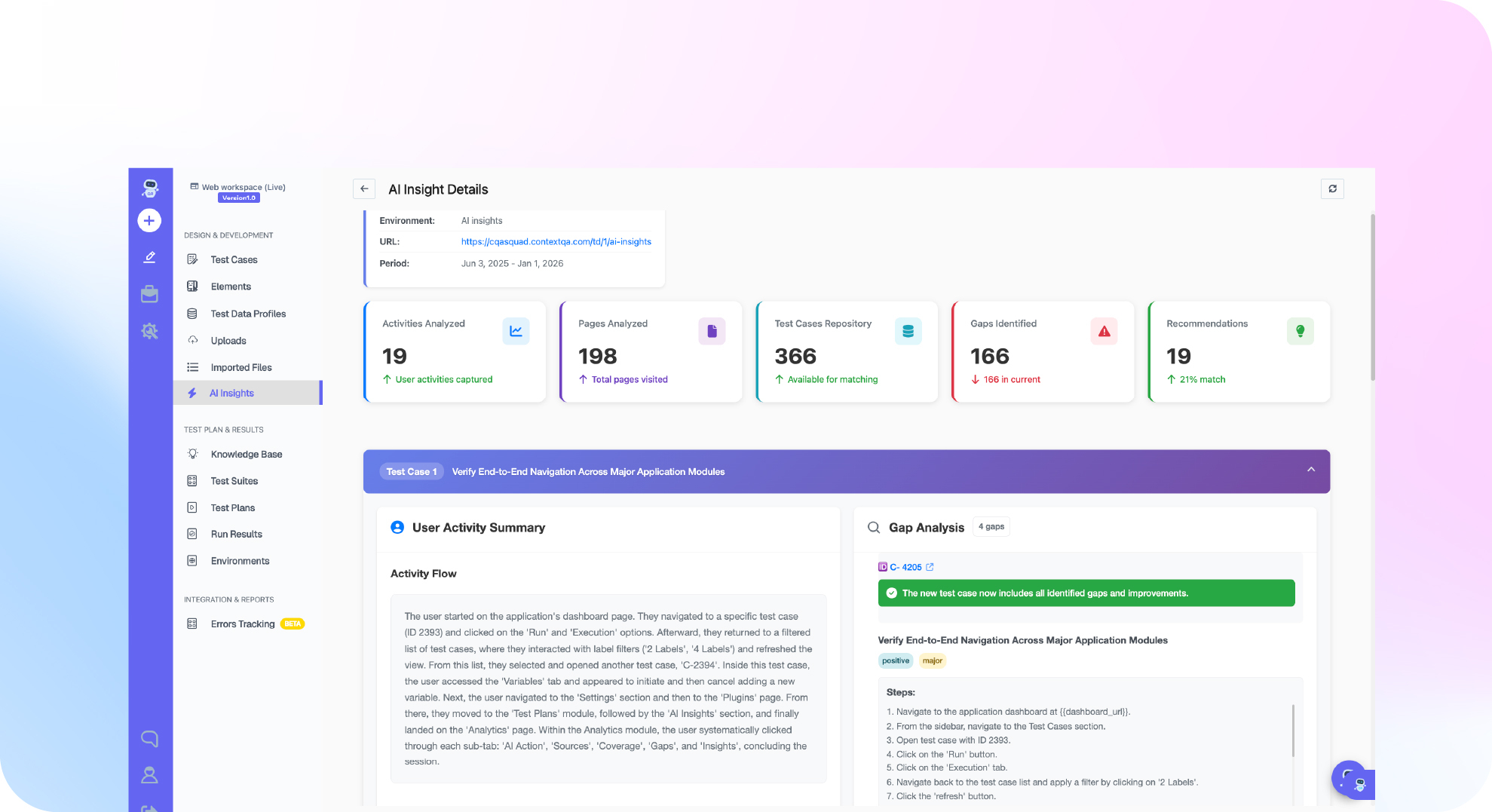
What it is: An agentic AI testing platform that combines test management, test execution, self healing automation, root cause analysis, and AI analytics in a single platform. ContextQA does not just manage tests. It generates them from code changes, executes them across web, mobile, API, SAP, Salesforce, and more, and classifies every failure automatically.
Key strengths:CodiTOS auto generates test cases from code changes. AI insights and analytics provides test management with intelligent reporting. Root cause analysis classifies every failure by type. AI based self healing eliminates selector maintenance. Covers all testing types: web, mobile, API Testing, SAP, Salesforce, visual,performance, security, database, and AI agents testing.
Pricing: Custom pricing. 12 week pilot program available with measurable benchmarks.
Best for: Teams that want to consolidate test management and test execution into one AI powered platform instead of managing separate tools.
Proof: IBM case study: 5,000 test cases. G2 reviews: 50% regression time reduction, 80% automation rate.
2. TestRail (Best Standalone Test Management)
What it is: A dedicated test case management tool used by QA teams to organize, track, and report on testing activities. TestRail does not execute automated tests itself but integrates with automation tools and CI/CD pipelines.
Key strengths: Intuitive test case editor with custom fields. Milestone and test plan management. Built in reports and dashboards. Strong Jira integration. API for custom integrations. Well established with a large user base.
Pricing: Cloud starts at approximately $39 per user/month. Server edition available for on premises deployment.
Best for: QA teams that need a dedicated system for organizing manual and semi automated testing workflows without built in execution.
3. Zephyr Scale (Best for Jira Native Teams)
What it is: A test management app that runs inside Jira, making it ideal for teams already using Atlassian’s project management ecosystem.
Key strengths: Native Jira integration (no context switching). Test cases, test cycles, and results all within Jira. Requirements traceability linked to Jira issues. Reusable test steps. Bulk execution and reporting.
Pricing: Starts at approximately $12 per user/month for Jira Cloud.
Best for: Teams that live in Jira and want test management without leaving the Atlassian ecosystem.
4. Xray (Best Jira Alternative with Advanced Features)
What it is: Another Jira native test management app that competes directly with Zephyr Scale, offering more advanced features like test versioning and parameterized testing.
Key strengths: Full test lifecycle management inside Jira. Support for manual, automated, and BDD tests. Parameterized testing and test sets. Integration with Jenkins, Bamboo, and other CI tools. Requirements and defect traceability.
Pricing: Starts at approximately $10 per user/month for Jira Cloud.
Best for: Jira teams that need more advanced features than Zephyr Scale provides, especially BDD support and test versioning.
5. qTest (Best for Large Enterprise Tricentis Ecosystem)
What it is: Tricentis qTest is an enterprise test management platform that integrates with Tosca, Testim, and the broader Tricentis quality suite.
Key strengths: Enterprise scale test management. Integration with Tricentis Tosca for model based testing. Requirements management and traceability. Advanced analytics and reporting. Session based exploratory testing module.
Pricing: Enterprise pricing (custom quotes). Typically significantly higher than mid market alternatives.
Best for: Large enterprises already using Tricentis Tosca or considering the full Tricentis quality platform.
6. PractiTest (Best for QA Team Analytics)
What it is: A SaaS test management platform focused on quality analytics, customizable workflows, and end to end visibility into testing activities.
Key strengths: Customizable dashboards and reporting. Filter sets for complex test organization. API and integration marketplace. SOC 2 compliant. Requirements, test, and defect management in one tool.
Pricing: Starts at approximately $39 per user/month.
Best for: QA managers who need deep analytics and customizable reporting across testing activities.
7. TestLink (Best Free Open Source Option)
What it is: A free, open source test management tool that has been available since 2005. TestLink provides basic test case management, test plan organization, and reporting.
Key strengths: Completely free and open source. Self hosted (full data control). Test case versioning. Requirements management. Basic reporting and metrics.
Pricing: Free (open source). Self hosting costs only.
Best for: Small teams or startups with no budget for test management software who can self host.
8. Kiwi TCMS (Best Modern Open Source)
What it is: A modern, open source test case management system built with Python and Django. More actively maintained than TestLink with a more modern interface.
Key strengths: Active open source development. Docker based deployment. REST API. Plugin ecosystem. Telemetry and reporting. LDAP/SAML authentication.
Pricing: Free (open source) with optional hosted plans.
Best for: Teams that want open source flexibility with a more modern interface than TestLink.
9. SpiraTest (Best for Requirements Traceability)
What it is: An integrated ALM (Application Lifecycle Management) platform from Inflectra that combines test management with requirements, defects, and risk management.
Key strengths: End to end requirements traceability matrix. Risk based testing. Source code association. Automated test integration (Selenium, Appium). On premises and cloud deployment.
Pricing: Starts at approximately $42 per user/month.
Best for: Regulated industries (healthcare, finance, defense) that need full requirements to test to defect traceability for compliance audits.
10. Allure TestOps (Best for Developer Focused Teams)
What it is: A test operations platform built on top of the popular open source Allure Framework reporting tool, adding test management and analytics.
Key strengths: Beautiful test reports (inherited from Allure Framework). Deep CI/CD integration. Test history and trend analysis. Flaky test detection. Developer friendly workflow.
Pricing: Free community edition. Paid plans start at approximately $30 per user/month.
Best for: Engineering teams that already use Allure Framework for reporting and want to add management capabilities.
11. Testmo (Best Modern Lightweight Option)
What it is: A modern, fast test management tool designed for speed and simplicity, with a focus on both manual and automated test workflows.
Key strengths: Fast, clean interface. GitHub, GitLab, and Bitbucket integration. Automated test result ingestion. Session based exploratory testing. Reporting and analytics.
Pricing: Starts at approximately $15 per user/month.
Best for: Small to mid size teams that want a modern, lightweight alternative to TestRail without enterprise overhead.
12. Azure Test Plans (Best for Microsoft Ecosystem)
What it is: Microsoft’s test management solution within Azure DevOps, providing test planning, execution, and tracking integrated with Azure Boards and Pipelines.
Key strengths: Native Azure DevOps integration. Manual and exploratory testing tools. Automated test result collection from Azure Pipelines. Requirements traceability through Azure Boards. Enterprise compliance (Azure’s compliance certifications).
Pricing: Included with Azure DevOps. Test Plans add on starts at approximately $52 per user/month.
Best for: Teams fully invested in the Microsoft and Azure DevOps ecosystem.
13. TestMonitor (Best for Stakeholder Collaboration)
What it is: A test management tool designed for both QA teams and business stakeholders, with a focus on accessibility for non technical users.
Key strengths: Clean, non technical interface for business users. Requirements linking and traceability. Milestone based test planning. Risk analysis. Multi project support.
Pricing: Starts at approximately $29 per user/month.
Best for: Organizations where non technical stakeholders (product managers, business analysts) need to participate in testing activities.
14. Tuskr (Best Budget Friendly Modern Tool)
What it is: A newer test management tool focused on simplicity and affordability for small and mid size teams.
Key strengths: Simple, clean interface. Jira, Slack, and CI/CD integrations. Test run management with assignment tracking. Affordable pricing for small teams. API access.
Pricing: Starts at approximately $7 per user/month. Free tier available.
Best for: Small teams that need basic test management at the lowest possible cost.
15. Katalon TestOps (Best for Katalon Framework Users)
What it is: The test management and analytics layer for teams using the Katalon test automation framework, providing centralized execution management and reporting.
Key strengths: Native integration with Katalon Studio. Centralized test execution scheduling. Visual testing analytics. CI/CD integration. Free tier available.
Pricing: Free basic tier. Business plans start at approximately $20 per user/month.
Best for: Teams already using the Katalon automation framework who want a management layer on top.
Summary Comparison Table
| Tool | Best For | AI/Automation Built In | Pricing Start | Open Source |
| ContextQA | AI management + execution | Yes (full) | Custom (pilot available) | No |
| TestRail | Standalone test management | No | ~$39/user/mo | No |
| Zephyr Scale | Jira native teams | No | ~$12/user/mo | No |
| Xray | Advanced Jira features | No | ~$10/user/mo | No |
| qTest | Enterprise Tricentis | Partial | Custom | No |
| PractiTest | QA analytics | No | ~$39/user/mo | No |
| TestLink | Free basic management | No | Free | Yes |
| Kiwi TCMS | Modern open source | No | Free | Yes |
| SpiraTest | Requirements traceability | Partial | ~$42/user/mo | No |
| Allure TestOps | Developer focused teams | Partial | ~$30/user/mo | Partial |
| Testmo | Modern lightweight | No | ~$15/user/mo | No |
| Azure Test Plans | Microsoft ecosystem | Partial | ~$52/user/mo | No |
| TestMonitor | Stakeholder collaboration | No | ~$29/user/mo | No |
| Tuskr | Budget friendly | No | ~$7/user/mo | No |
| Katalon TestOps | Katalon framework users | Partial | Free + paid | No |
How to Choose the Right Tool
Step 1: Decide if you need management only or management plus execution. If your team automates tests and wants AI to handle generation, execution, and analysis, ContextQA eliminates the need for separate management and execution tools. If your team primarily does manual testing and needs a place to organize that work, a standalone tool like TestRail or Zephyr Scale is sufficient.
Step 2: Check your existing ecosystem. If you live in Jira, Zephyr Scale or Xray are natural choices. If you use Azure DevOps, Azure Test Plans integrates natively. If you use Tricentis, qTest fits the stack.
Step 3: Set your budget. Free: TestLink or Kiwi TCMS. Under $15/user: Tuskr, Xray, Zephyr Scale, or Testmo. $30+/user: TestRail, PractiTest, SpiraTest, or Allure TestOps. Custom enterprise: ContextQA or qTest.
Step 4: Evaluate for 2 to 4 weeks. Most tools offer free trials. ContextQA’s pilot program runs for 12 weeks with measurable before and after data, which is more thorough than a typical trial.
Use the ContextQA ROI calculator to model whether consolidating management and execution into one platform saves money compared to separate tools.
Book a demo to see how ContextQA combines test management with AI powered execution.