
TL;DR: A root cause analysis (RCA) template gives QA teams a repeatable structure for tracing defects back to their actual origin instead of patching surface symptoms. The best templates combine the 5 Whys technique, fishbone diagrams, and an action tracking section. This guide includes ready-to-use templates, real software testing examples, and shows how ContextQA’s automated root cause analysis reduces defect investigation time from 45 minutes to under 5.
Key Takeaways:
- A good RCA template has five sections: problem statement, investigation method, root cause identification, corrective action, and verification.
- The 5 Whys technique works for straightforward defects; fishbone diagrams work better for complex, multi-factor issues.
- ISTQB defines root cause analysis as part of defect management in the test process, connecting it directly to test improvement.
- Manual RCA takes an average of 45 minutes per failure; AI-powered RCA through ContextQA reduces that to under 5 minutes.
- Teams that run RCA consistently reduce recurring defect rates by 30 to 50% within two release cycles.
- ContextQA captures failure paths automatically and traces issues through visual, DOM, network, and code layers.
- Always separate root cause categories: code defect, test implementation issue, environment problem, or transient failure.
Definition: Root Cause Analysis (RCA) The systematic process of identifying the fundamental cause of a defect or failure, as opposed to addressing surface-level symptoms. ISTQB defines it as a technique aimed at identifying the root causes of defects to reduce their occurrence through targeted process improvements.
I’m going to say something that will sound harsh: if your team is seeing the same bugs show up release after release, the problem isn’t your testers. It’s the absence of a structured root cause analysis process.
The DORA State of DevOps research consistently shows that elite-performing teams fix failures faster because they understand why failures happen, not just that they happened. And yet, most QA teams I’ve worked with don’t have a standardized RCA template. They debug reactively, fix the symptom, and move on.
That cycle costs real money. A test failure takes an average of 45 minutes to investigate manually. If your team investigates 50 failures per week, that’s 37.5 hours of engineering time spent on detective work. Every single week.
ContextQA’s root cause analysis capability traces failures through visual, DOM, network, and code layers automatically. It drops that 45-minute investigation down to under 5 minutes. But even without automation, a structured RCA template dramatically improves how teams learn from failures.

Quick Answers:
What is a root cause analysis template? A structured document or form that guides QA teams through the process of tracing a software defect from its visible symptom to its fundamental cause. It typically includes a problem statement, investigation steps, root cause identification, corrective actions, and verification.
Which RCA method is best for software testing? The 5 Whys technique works best for simple, linear defect chains. Fishbone (Ishikawa) diagrams work better for complex issues with multiple contributing factors. AI-powered tools like ContextQA handle high-volume analysis automatically.
How often should QA teams run root cause analysis? Run RCA on every critical or recurring defect. For lower-priority issues, batch RCA sessions weekly. Elite DevOps teams (per DORA research) run RCA as part of every incident review.
The Complete RCA Template for Software Testing
I’ve seen dozens of RCA templates. Most are either too generic (designed for manufacturing, not software) or too simple (just a text field labeled “root cause”). Here’s a template built specifically for QA teams, with every section serving a clear purpose.
Section 1: Problem Statement
| Field | What to Document | Example |
| Defect ID | Ticket or bug reference | JIRA-4521 |
| Date discovered | When the issue first appeared | 2026-03-18 |
| Environment | Where it failed | Staging, Chrome 124, Ubuntu 22.04 |
| Severity | Business impact level | P1 (blocks checkout flow) |
| Symptom description | What happened (observable behavior) | Payment confirmation page shows “undefined” instead of order total |
| Expected behavior | What should have happened | Order total displays as “$127.50” |
| Frequency | How often it occurs | 3 out of 10 test runs (intermittent) |
Don’t skip the frequency field. An intermittent defect and a consistent defect almost always have different root causes. Intermittent failures often point to race conditions, timing issues, or environment instability. Consistent failures usually trace back to code logic or data problems.
Section 2: Investigation Method
Pick the method that matches the defect’s complexity.
For single-chain defects (use 5 Whys):
Definition: 5 Whys Technique An iterative interrogative method used to explore cause-and-effect relationships. By repeatedly asking “why” (typically five times), teams peel back layers of symptoms to arrive at the root cause. Originally developed by Sakichi Toyoda for Toyota’s manufacturing process.
Here’s a real example from a team I worked with:
- Why does the payment page show “undefined”? Because the API response doesn’t include the orderTotal field.
- Why is orderTotal missing from the API response? Because the pricing microservice returns a null value for orders with discount codes.
- Why does the pricing service return null for discounts? Because the discount calculation function divides by zero when the discount percentage is 100%.
- Why doesn’t the function handle 100% discounts? Because the validation layer only checks for discounts between 1% and 99%.
- Why was 100% excluded from validation? Because the original spec didn’t include free-item promotions. Root cause found.
That took 8 minutes. Without the structured approach, this team had already spent 3 hours blaming the frontend for a backend validation gap.
For multi-factor defects (use fishbone diagram):
Definition: Fishbone Diagram (Ishikawa) A visual root cause analysis tool that maps potential causes across categories (People, Process, Technology, Environment, Data, Tools) leading to a single effect. Named after Kaoru Ishikawa, who pioneered its use in quality management.
Map potential causes across six categories:
| Category | Example Causes in Software Testing |
| Code | Logic error, missing validation, race condition, unhandled exception |
| Data | Corrupt test data, missing seed records, stale database state |
| Environment | Server configuration mismatch, network latency, resource limits |
| Process | Missing code review, skipped regression, incomplete test coverage |
| People | Knowledge gap, miscommunication between dev and QA, new team member |
| Tools | Outdated test framework, flaky selector strategy, CI timeout settings |
Section 3: Root Cause Classification
This is the step most templates miss. Don’t just write “found the bug.” Classify the root cause into one of four categories. This classification tells you who owns the fix and what type of corrective action is needed.
| Classification | Definition | Who Owns the Fix | Example |
| Code defect | Functional regression introduced by a code change | Developer | Null pointer in discount calculation |
| Test implementation issue | Test logic error or outdated assertion | QA engineer | Stale selector targeting wrong element |
| Environment problem | Infrastructure, network, or data issue | DevOps/Platform | Staging database missing test records |
| Transient failure | Timing, race condition, or temporary glitch | Retry with monitoring | API timeout during peak CI load |
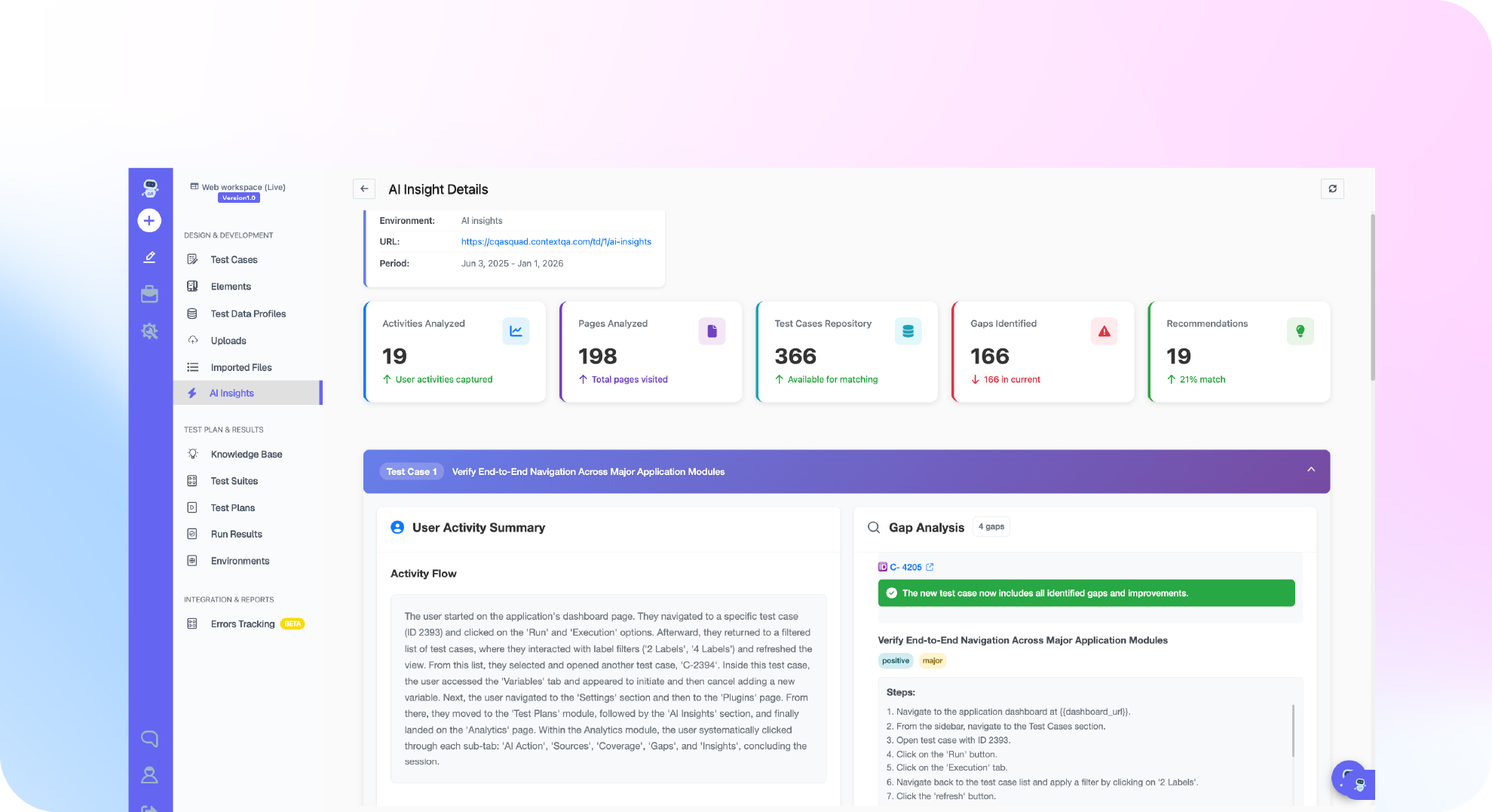
ContextQA’s AI insights and analytics performs this classification automatically during test execution. When a test fails, the platform analyzes visual output, DOM state, network responses, and code layer signals to determine which category the failure belongs to. That automation is what brings investigation time from 45 minutes down to under 5.
Section 4: Corrective Action Plan
| Field | Details |
| Root cause summary | One-sentence description of the actual cause |
| Corrective action | Specific fix to implement |
| Owner | Name of the person responsible |
| Deadline | When the fix must be deployed |
| Preventive action | Process change to prevent recurrence |
| Preventive owner | Name of the person responsible for the process change |
The preventive action field separates good RCA from busy work. Fixing the bug addresses this instance. Preventing recurrence addresses the system that allowed the bug to exist.
Section 5: Verification
| Verification Step | Status | Date |
| Fix deployed to staging | Pending / Complete | |
| Original test case passes | Pending / Complete | |
| Regression suite passes (related area) | Pending / Complete | |
| No recurrence after 2 release cycles | Pending / Complete |
Why Structured RCA Connects to Shift Left Testing
The ISTQB Foundation Level syllabus places root cause analysis within defect management, directly linking it to test process improvement. But the real value of RCA shows up when you connect it to shift left testing practices.
When RCA data accumulates over time, patterns emerge. If 40% of your root causes trace back to missing input validation, that’s not a testing problem. That’s a development practice problem. Share the RCA data with your engineering leads and push for validation standards during code review.
The DORA research program measures deployment frequency, lead time, change failure rate, and mean time to recovery. RCA directly impacts the last two metrics. Teams that systematically identify root causes recover faster (because they know where to look) and fail less often (because they fix systemic issues, not just symptoms).
ContextQA integrates with this workflow through its risk-based testing capabilities. The platform prioritizes tests based on failure history and code change analysis, so the areas most likely to fail (based on RCA data) get tested first.
Limitations Worth Knowing
RCA isn’t a silver bullet, and pretending otherwise would undermine the credibility of everything else in this post.
First, RCA requires honest participation. If team members fear blame, they’ll attribute root causes to safe categories (“environment issue”) instead of accurate ones (“I missed this during code review”). Blameless RCA culture takes deliberate effort to build.
Second, not every defect justifies a full RCA. A cosmetic alignment issue on a low-traffic page doesn’t need a fishbone diagram. Reserve full RCA for critical, recurring, or high-impact defects. Batch minor issues into weekly review sessions.
Third, RCA data has a shelf life. A root cause pattern from 18 months ago may no longer apply after architecture changes. Review and prune your RCA database quarterly to keep it relevant.
How ContextQA Automates the Hard Parts
The IBM case study shows ContextQA migrating 5,000 test cases using watsonx.ai NLP models. That same AI infrastructure powers the platform’s root cause analysis engine.
When a test fails in ContextQA, the platform doesn’t just report “test failed.” It:
- Captures a visual recording of the failure with DOM snapshots at each step.
- Analyzes network requests to identify API-level failures.
- Compares the current failure against previous runs to detect patterns.
- Classifies the failure into one of the four root cause categories automatically.
- Provides a suggested fix based on the failure pattern.
G2 verified reviews report that teams using ContextQA cleared 150+ backlog test cases in their first week. The 50% reduction in regression testing time comes partly from faster RCA: when you know why something failed in 5 minutes instead of 45, you can fix it and move on.
Deep Barot, CEO and Founder of ContextQA, described this philosophy in a DevOps.com interview: the goal is AI running 80% of common tests so QA teams focus on the 20% that require human insight. RCA automation is a perfect example. The platform handles routine classification; humans handle the novel, complex investigations.
ContextQA’s web automation and AI testing suite provide the test execution layer, while the root cause analysis feature provides the diagnostic layer. Together with the IBM Build partnership and G2 High Performer recognition, this gives teams a complete system for both running tests and understanding their results.
Do This Now Checklist
- Download and customize the template above (15 min). Copy the five-section RCA template into your team’s wiki or documentation system. Adjust the classification categories if your organization uses different terminology.
- Run RCA on your top 3 recurring defects (30 min each). Pick the three bugs that keep coming back. Apply the 5 Whys technique to each. Document the root causes and corrective actions.
- Set up automated failure classification in ContextQA (20 min). Connect ContextQA’s root cause analysis to your test suite. Run your existing tests and review the automated classifications.
- Create a root cause category report (15 min). After two weeks of RCA data, group findings by category (code, test, environment, transient). Share with engineering leadership. The distribution tells you where process improvements will have the most impact.
- Establish a weekly RCA review cadence (recurring, 30 min). Schedule a 30-minute weekly session where QA and engineering review RCA findings together. Focus on preventive actions, not blame.
- Start a ContextQA pilot (15 min to set up). The 12-week pilot program benchmarks your current defect investigation time against AI-powered RCA. Published results show 40% improvement in testing efficiency.
Conclusion
A root cause analysis template turns defect investigation from an ad-hoc guessing game into a repeatable process that makes your entire team better over time. The five-section structure (problem, investigation, classification, action, verification) gives QA teams a consistent path from symptom to solution.
But templates alone don’t scale. When your test suite generates hundreds of failures per sprint, you need automation. ContextQA’s AI-powered root cause analysis classifies failures in seconds, traces them through multiple system layers, and gives your team the evidence to fix issues at their source.
Book a demo to see automated RCA in action with your own test suite.