TL;DR: Enterprise integration testing checks that a business process works from its first system to its last, not just that each application passes its own tests. The average enterprise now runs 897 applications and only 29% of them are integrated, according to the MuleSoft 2025 Connectivity Benchmark, so most breakages happen in the handoffs. The practical answer is one test per business process that drives the UI where people work and asserts the data at every hop through APIs and backend checks. That replaces a pile of disconnected scripts, one per system, that each pass while the process fails.
A sales rep closes a deal in the CRM, and three days later finance notices the customer was never invoiced. Every team's regression suite was green. This guide is for the QA leads, architects and release managers who own that gap.
Quick answers
What is enterprise integration testing?
It is testing a business process across every application it touches, such as CRM, ERP, billing, HR and payroll, and verifying that data and state arrive correctly at each step. The unit under test is the process, not the application.
How is it different from system integration testing?
System integration testing usually verifies one interface between two systems, such as an API contract or a file feed. Enterprise integration testing chains those interfaces into the full flow a business user depends on, so it catches sequencing, timing and data mapping errors that pairwise tests miss.
Do I need a separate automation script for each system?
No. A single test can drive a CRM screen, call an ERP API, query a billing record and read an email, as long as your tooling can switch between UI, API and backend steps inside one run. Separate scripts per system tend to drift apart and leave the handoffs untested.
Why do business processes break between applications, not inside them?
Most enterprise defects that reach users live in the seams. Each application team tests its own release, but nobody owns the moment when a CRM record becomes an ERP sales order or a new hire in the HR system becomes a payroll record.
The causes are predictable:
- Field mapping drift. A picklist value added in the CRM has no match in the ERP, so the integration drops or defaults it.
- Async timing. Queues, batch jobs and scheduled syncs mean the downstream record appears minutes or hours later.
- Upgrade side effects. A quarterly SaaS release changes a layout or API version, and the integration breaks with no code change on your side.
- Ownership gaps. The CRM, ERP and integration teams each assume someone else tests the full flow.

What does end-to-end business process testing actually cover?
End-to-end business process testing covers the path a transaction takes through every system, plus the side effects people rely on: documents, notifications, ledger entries and status changes. It is narrower than testing every feature and wider than testing any one app.
A useful way to scope it is to list your top revenue and compliance processes and map the systems each one touches:
- Lead-to-cash: Systems touched: CRM, CPQ, ERP, billing, email; What to assert at each hop: Opportunity stage and amount, sales order lines and pricing, invoice totals and tax, confirmation email content
- Hire-to-retire: Systems touched: HR system, identity provider, payroll, benefits; What to assert at each hop: Employee record and start date, account provisioning, pay group and salary, benefits enrollment, termination and final pay
- Procure-to-pay: Systems touched: Procurement portal, ERP, supplier portal, AP; What to assert at each hop: Requisition approval, purchase order, goods receipt, three-way match, payment run
- Order-to-ship: Systems touched: Custom app, ERP, warehouse system; What to assert at each hop: Order status, inventory reservation, shipment record, tracking notification
Start with two or three. Enterprise integration testing is about depth on the processes that would hurt most if they failed. This is where general enterprise application testing practice turns into something specific: named processes, named systems and named assertions.
How do you build a lead-to-cash test with assertions at every hop?
Build it as one test that follows a single deal from the CRM to the customer's inbox, with a UI action where a person would act and an API or backend check wherever data moves between systems. Every hop gets an explicit assertion, so a failure points to the exact handoff that broke.
Here is a worked example for a Salesforce-style CRM, an ERP such as SAP or NetSuite, and a separate billing system:
- Seed data through APIs. Create an account, contact and opportunity in the CRM tagged with a unique run ID, such as
ACME-RUN-4821. Assert the API returns record IDs and store them. - Close the opportunity in the UI. As a sales user, add two product lines and move the stage to Closed Won. Assert stage, amount and close date on screen, then confirm the same values through the CRM REST API.
- Verify the sales order in the ERP. Poll the ERP API (for SAP, the inbound IDoc or BAPI result) until an order linked to the opportunity exists, using a timeout instead of a fixed sleep. Assert customer number, lines, quantities, prices, currency and payment terms.
- Check the invoice in billing. Query for an invoice referencing the sales order. Assert total, tax, billing address and due date. Trigger the billing run through its API rather than waiting for the nightly job.
- Validate the confirmation email. Capture the email sent to the test contact, which is what email testing is built for. Assert recipient, subject, invoice number, amount and that the payment link resolves.
- Close the loop in the CRM. Assert that the order number or invoice status synced back to the opportunity.
- Clean up. Cancel the order and invoice through APIs and purge records carrying the run ID.
Hops three and four are data checks, not screenshots, so a cosmetic ERP UI change does not fail the run. The run ID ties every record together, so debugging means searching one string across systems.
Want to see a lead-to-cash flow running across CRM, ERP and billing in one test? Book a demo and bring one of your own processes.
How do you manage test data across ERP, CRM and HR systems?
Create the data each test needs at the start of the run, through APIs, and make it unique to that run. Shared, long-lived test records are the main reason cross-application tests become flaky and impossible to run in parallel.
Google's DORA research on test data management recommends that tests create the necessary state themselves as part of setup using the application's APIs, and notes that isolating test data is a prerequisite for running tests in parallel. In enterprise systems that advice needs a few adjustments:
- Master data often needs approvals. Keep a small, versioned set of stable customers, materials and pay groups per environment, and create only transactional data per run.
- Keys must line up across systems. A CRM account needs a matching ERP customer. Seed both in setup, or reuse a known mapped pair.
- Sensitive data stays out. For hire-to-retire tests, generate synthetic employees. Never copy production HR or payroll records.
- Cleanup is part of the test. Leftover open sales orders will eventually break someone else's run.
Should you mock integrations or test against real systems?
Use both, at different layers. Mock external systems in fast, frequent pipeline stages, and run a smaller set of end-to-end business process tests against real, connected test environments before release.
The tradeoff is well documented. A widely cited post on the Google Testing Blog argues that the realism of end-to-end tests is quickly outweighed by slow feedback and flakiness when teams rely on them too heavily. Martin Fowler's description of contract tests gives the complement: run most tests against test doubles, and run separate contract tests that confirm those doubles still behave like the real service.
A practical split for testing ERP and CRM integrations:
Mock when
- The system is a third party you do not control, such as a tax engine or payment gateway.
- You are testing your own integration logic, like retries or field transformations.
Use the real system when
- You need to prove the full process works with real configuration and approvals.
- A vendor upgrade or configuration change is going live.
- The path runs through SAP IDocs, BAPIs or RFCs, whose behavior depends on client customizing.

How do you deal with environment availability and ownership across teams?
Treat the end-to-end environment as a shared product with an owner, a calendar and a health check. Cross-application tests often fail from environment problems rather than real defects, and nobody triages a failure that five teams think belongs to someone else.
- One owner per process. The lead-to-cash test belongs to a named QA lead, even though sales ops, finance IT and the integration team own the systems.
- A pre-flight check. Ping each system's health endpoint and verify test user logins first. If the ERP sandbox is down, report that instead of failing 40 tests.
- Visible refresh schedules. Publish sandbox refresh dates so data seeding reruns afterward.
- Failure routing by hop. Send a hop-three failure to the ERP integration team and a hop-five failure to the email template owner.
How do you run cross-application tests in CI/CD?
Run them as a gated stage after each system's own tests pass, nightly and on any release touching a participating system. Keep the stage short, and let it block promotion when a critical process breaks.
- Unit and component tests per application on every commit.
- Contract and API tests with mocked neighbors on every merge.
- End-to-end business process tests in the connected environment on each release candidate.
- A short production smoke run of the top two processes with reserved test accounts.
This is where continuous testing across the delivery pipeline matters. A test that only runs when someone remembers will miss the SaaS upgrade that broke order sync on a Tuesday.
How does ContextQA handle tests that span multiple enterprise systems?
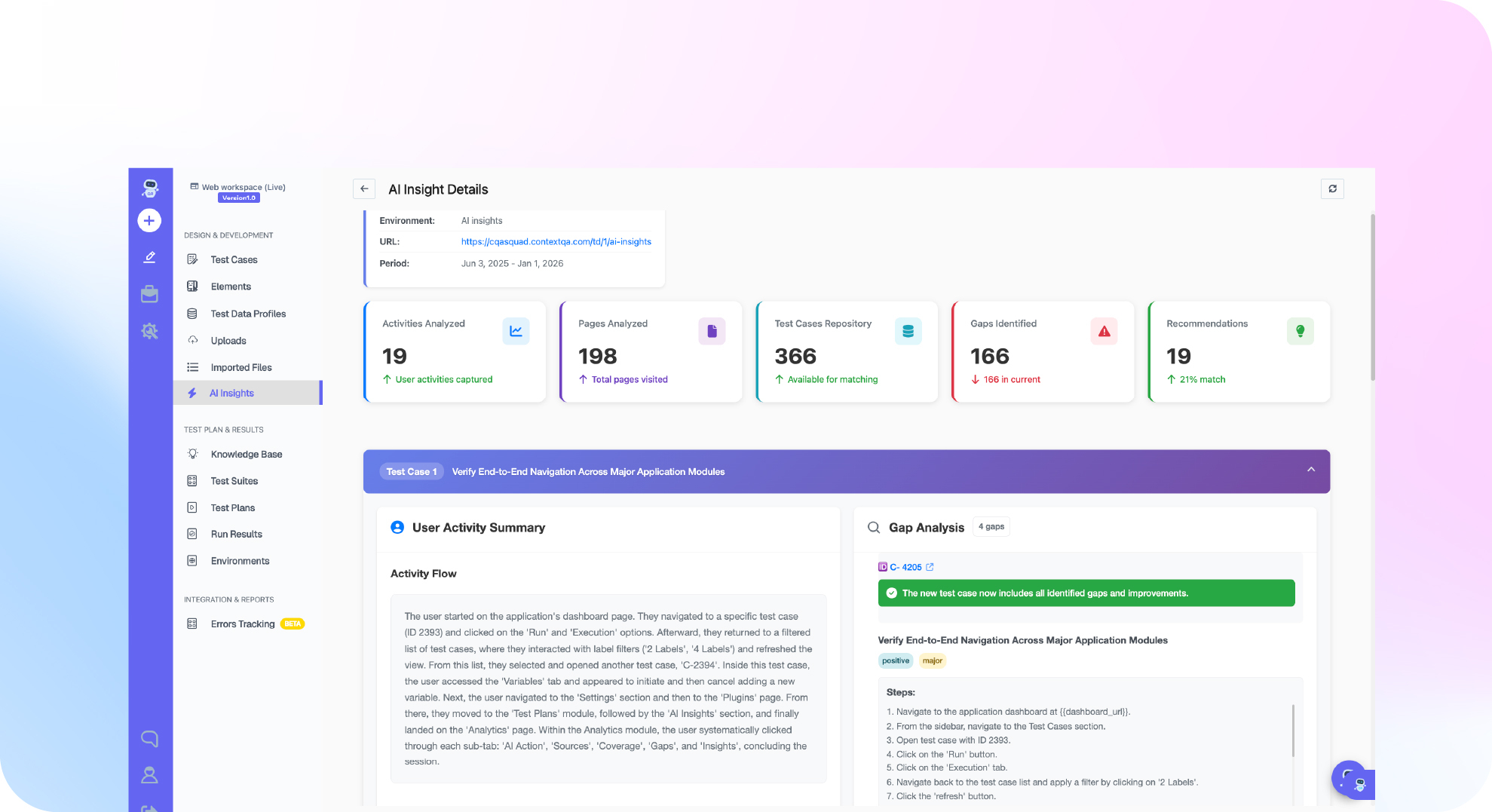
ContextQA runs UI, API and backend steps in one test, so a single business process test can move from a CRM screen to an ERP API check to an email assertion without stitching scripts together. That mix of step types in one run is the core requirement for enterprise integration testing.
- Coverage: SAP, Oracle, Workday and custom ERP, Salesforce and other CRM workflows, plus REST and GraphQL API testing.
- Below the SAP UI: SAP testing validates IDocs, BAPIs and RFCs alongside the screens and orchestrates processes across SAP and third-party systems.
- Less maintenance: tests are generated from user flows, including error states and edge cases, and broken selectors auto-heal through multi-attribute recognition.
- Faster triage: root cause analysis traces failures through visual, DOM, network and code layers, and AI insights flag tests going flaky.
- Pipeline fit: connectors for Jenkins, GitHub Actions, GitLab CI, CircleCI and Azure DevOps with quality gates that block bad deployments, code export to Playwright, Selenium, Robot and WebdriverIO, and on-premises deployment.
If you are comparing platforms rather than designing tests, our guide on evaluating an enterprise AI testing platform covers selection criteria for QA leaders.
Ready to replace per-system scripts with one test per business process? See how ContextQA handles enterprise software testing across ERP, CRM and custom apps.
Bottom line
Your applications can each pass their own tests while the process that pays your bills is broken. Enterprise integration testing closes that gap by testing the process as the unit, with an assertion at every handoff and data created fresh for every run.
Start with one process, usually lead-to-cash, write it as a single test that mixes UI, API and backend checks, and put it behind a quality gate. Once it is stable, add hire-to-retire or procure-to-pay, and assign each one an owner.
Sources
- MuleSoft Connectivity Benchmark 2025, Salesforce, https://www.salesforce.com/blog/mulesoft-connectivity-benchmark-2025/ (supports: average enterprise manages 897 applications, only 29% integrated)
- Capabilities: Test data management, DORA (Google Cloud), https://dora.dev/capabilities/test-data-management/ (supports: tests should create their own state via APIs; isolated test data enables parallel runs)
- Just Say No to More End-to-End Tests, Google Testing Blog, https://testing.googleblog.com/2015/04/just-say-no-to-more-end-to-end-tests.html (supports: tradeoff between end-to-end realism and slow, flaky feedback)
- ContractTest, Martin Fowler, https://martinfowler.com/bliki/ContractTest.html (supports: using test doubles plus contract tests to keep doubles consistent with real services)