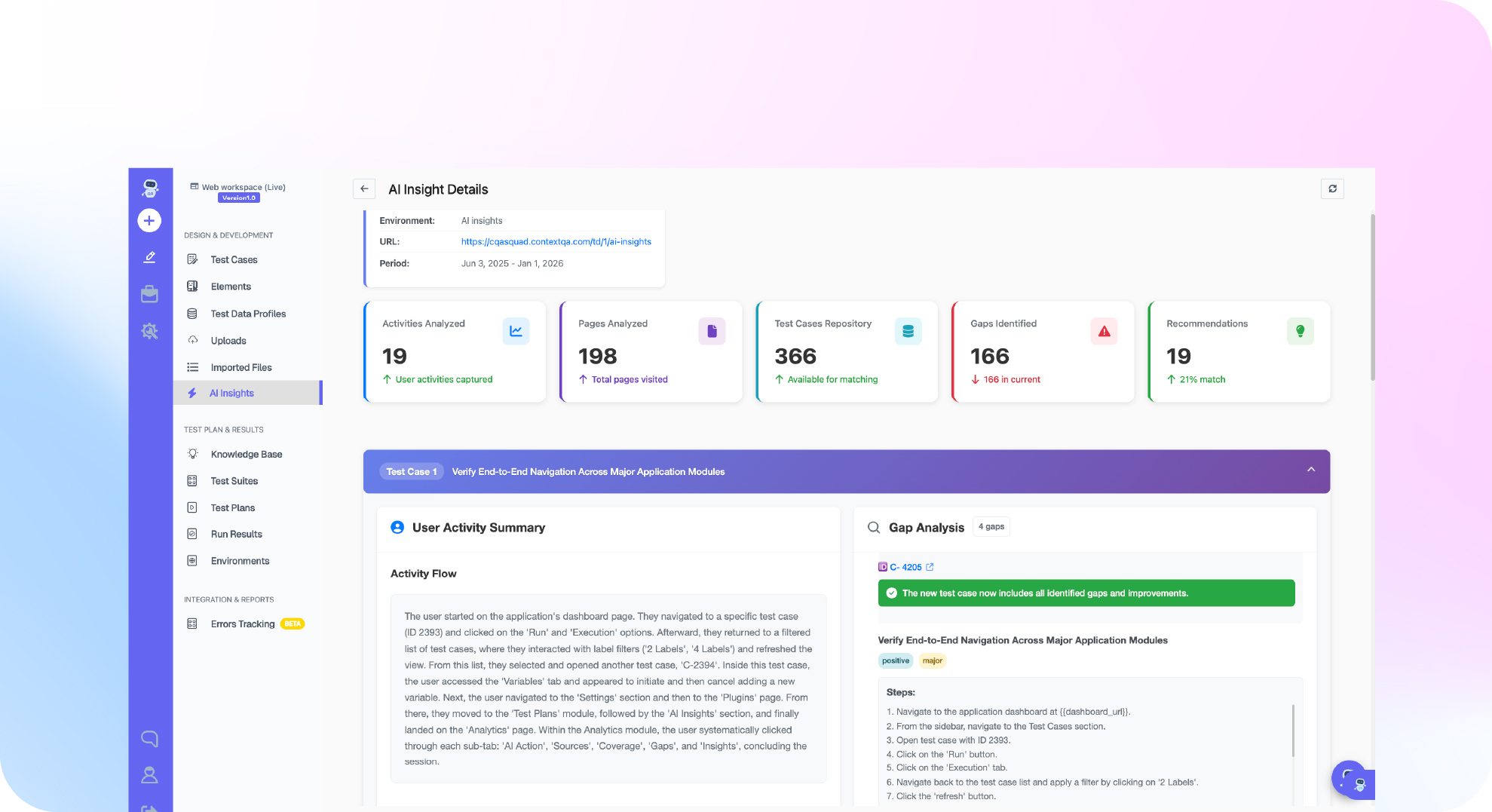

TL;DR: Codex automated testing works when you give OpenAI Codex three things: a behavior contract, your repository's real test commands in `AGENTS.md`, and a rule to report the command, exit status and results instead of a summary. Codex can write and run unit and integration tests in its execution environment. Browser journeys need their own proof. ContextQA is an autonomous quality engineer. Connect it through its MCP server, and Codex can create, run and inspect end to end tests. You then gate the change on the actual results.
Many teams hit the same gap with AI agents: Codex edits the code and reports success, but nobody can show that the real user journey still works. This tutorial covers four steps. Connect ContextQA to Codex through MCP (Model Context Protocol), run end to end tests after every edit, read the results, and gate the merge on them.
Quick answers
Can Codex run end to end tests by itself, or do I need a separate tool? Codex can run your existing browser suite if it can reach the runner and a test environment. ContextQA MCP at https://mcp.contextqa.com/mcp adds managed tests that Codex can create, run and inspect. Use repository checks for speed and MCP to prove the full journey (Testing with Codex).
How do I keep Codex from making tests pass by weakening them? Write the rule in AGENTS.md: no weakened assertions, no skipped tests and no snapshot updates that hide failures. Require the command, environment, exit status and results, with blocked checks listed separately. Have Codex plant a deliberate defect to prove an assertion fails (unit testing guide).
Should an engineering manager gate merges on end to end results from Codex? Yes, if a reviewer can check the evidence: the target environment, final assertions, retries, artifacts and first failure. The test must verify the business outcome on approved staging, for example by reading the saved record back through the API. Treat a blocked check as a failed gate (end to end guide).
What is codex automated testing and when do you need it?
In codex automated testing, OpenAI Codex writes, runs and reports on tests in your repository after it changes code, and you gate the change on that evidence. You need it once an agent writes code faster than your team can review it. At that point, an agent that says "tests pass" without showing runner output has proved nothing.
Codex reads the project instructions in AGENTS.md (OpenAI AGENTS.md guide). It can also inspect your repository, write tests and run the commands available in its execution environment. For testing, that includes your existing Jest, Vitest or pytest suite (ContextQA: Testing with Codex).
Repository tests check behavior at the code level. They do not cover a full browser journey. The ContextQA MCP server covers that layer. Codex signs in with OAuth 2.0 (the standard protocol that lets an app act on your account), then creates, runs and inspects managed tests (MCP Installation and Setup). It does not replace your local runner.
The decision for leaders: if a change touches a flow users can see, require both kinds of evidence before merge.
What do you need before you start?
You need four things: a Codex session on the correct checkout with dependencies installed, a disposable test environment with known fixtures and a cleanup step, an AGENTS.md file that lists your real test commands, and a ContextQA account connected through the hosted MCP server. If any of these is missing, a green result tells you nothing about the build you release.
Each test layer needs its own setup (ContextQA Codex guide):
- Unit tests: A behavior contract with boundary values and a passing baseline. These run through
jest,vitestorpytest, not through ContextQA MCP. - Integration tests: The real dependent services running in the test environment, plus fixtures with known expected records.
- End to end tests: An approved staging URL, an isolated test account and seed data.
- Connection: Copy the Codex configuration from Settings → MCP, sign in with OAuth 2.0 (no API keys), and confirm with a read only request (setup docs).

How do you wire Codex, MCP and CI together step by step?
The setup takes five steps. Write your test rules into AGENTS.md, connect the ContextQA MCP server, and record a baseline. Then let Codex make the edit and run both your repository tests and a ContextQA end to end case. Merge only when both layers pass and leave evidence a reviewer can inspect. Which agent you pick matters less than the test contract you give it.
- Write the contract. List your real test commands in
AGENTS.mdand forbid weakened assertions and snapshot updates that hide failures (OpenAI AGENTS.md guide). - Connect ContextQA. Open Settings → MCP, copy the Codex configuration for
https://mcp.contextqa.com/mcp, complete OAuth and send a read only request (setup docs). - Record a baseline. Ask Codex to run the focused tests and report the results before it changes any code (Codex guide).
- Edit, then verify. Codex runs your test runner. Through MCP, describe the journey, review the generated steps, run the case and pull the results (MCP overview).
- Gate the merge in CI. Fail the job on the runner's exit status:
npx playwright test tests/e2e/csv-export.spec.ts --reporter=line
status=$?; echo "e2e exit status: $status"; exit $status
What are the most common mistakes?
Five mistakes cause most false greens: trusting the agent's summary over runner output, letting it weaken assertions or skip failures, accepting clicks as proof, assuming ContextQA MCP runs the local unit suite, and never checking the connection. Each one leaves you with a passing gate that says nothing about the change you are about to merge.
- Guessed commands: If
AGENTS.mdlacks the real commands, Codex has no reliable test command to run, so use your project's real commands rather than a genericnpm testassumption (Testing with Codex). - Hidden failures: Forbid skipped tests and snapshot updates that hide failures. Report blocked checks apart from passing ones (Testing with Codex).
- Clicks as proof: A toast does not prove the record was saved. Check the stored state through the API (End to end testing).
- Wrong runner: ContextQA MCP is not a shell for Jest, Vitest or pytest. Those suites still run locally.
- Unverified connection: After OAuth, send a read only request before you allow any changes (Installation and Setup).
How do you know it is working?
The workflow is working when every Codex change comes with a receipt: the command, the environment, the exit status, the test results, and a ContextQA execution result for each affected browser journey. A green run on its own proves little. Confirm three things: tests fail when they should, reruns give the same result, and blocked checks are reported separately.
Developers have good reason to doubt AI output. In the 2025 Stack Overflow Developer Survey, 46% of developers said they distrust the accuracy of AI tools and 33% said they trust it. Flaky tests are an older problem. In 2016, Google's Testing Blog reported that about 1.5% of its test runs were flaky.
- Defect check: Have Codex add a deliberate bug and confirm that an assertion fails (unit testing guide).
- Assertions from the contract: Take expected values from approved requirements, not from whatever the current code returns.
- Flake rules in `AGENTS.md`: No fixed sleeps and no skipped tests. Keep the first failure.
- Proof of the outcome: Pull the actual ContextQA result details. A finished click sequence does not count as a pass.
How can you automate this workflow with ContextQA and Ship?
The automation has two layers. Codex runs your repository's own test commands, and in the same session the ContextQA MCP server lets Codex create, run and inspect managed browser tests. Smaller product teams can also use Ship, the ContextQA autonomous quality engineer, which tests every pull request with impact analysis and runs targeted regressions before merge.
- Connect Codex once. Use the configuration from Settings → MCP and verify it with a read only request (Installation and Setup).
- Run both layers after each edit. Codex runs your unit suite, then runs the affected journey through ContextQA and pulls the results (MCP overview).
- Gate the merge. Fail the pipeline on a nonzero exit status or on any failed or blocked ContextQA result. If you would rather not build that gate yourself, Ship runs targeted regressions on every pull request.
If Codex edits your code but nobody proves the full user journey still works before merge, see how Ship tests every pull request: get started free, no credit card needed.

What should you do right now?
Start this week with one high risk user journey, not a full rollout. Write your testing rules into AGENTS.md and connect the ContextQA MCP server to Codex. Have Codex run focused tests and one end to end journey after each edit. Merge only when the evidence shows passing assertions and a verified business outcome.
- Commit an
AGENTS.mdtesting section based on the template in the Codex testing guide. - Record a baseline, including existing failures, before Codex changes code.
- Pick one journey that has seed data, a disposable account and a cleanup step.
- Check plan limits on OpenAI's Codex pricing page before you scale.
- Compare results with your own baseline: escaped defects and hours spent maintaining tests.
Bottom line
A passing edit is only half the job. Put your real test commands and limits in AGENTS.md, connect ContextQA over OAuth, and verify the connection with a read only request. Have Codex run the affected browser journeys after each change, and block the merge until the results show that the business outcome happened.
Next, review the output against an AI generated code testing checklist and add automated security testing to the gate.
Sources
Claims about Codex link to OpenAI's documentation or to the ContextQA guides that describe the workflow. Every ContextQA workflow step links to the learning center page that documents it. Both statistics link to their original publishers, so you can check each step and number before you change your release process.
- OpenAI Codex docs: AGENTS.md guide
- OpenAI Codex docs: MCP
- OpenAI's Codex pricing page
- ContextQA: Testing with Codex
- ContextQA: MCP Installation and Setup
- ContextQA: MCP overview
- ContextQA: End to end testing with AI agents
- ContextQA: Unit testing with AI agents
- 2025 Stack Overflow Developer Survey
- Google Testing Blog, 2016: Flaky tests at Google