
TL;DR: AI does not speed up “testing.” It speeds up five specific jobs inside testing, and it is close to useless at three others. This guide names which jobs, names the tools that do each one, and gives the realistic time saving for each. It also covers the part most vendor content skips: in the Stack Overflow 2025 Developer Survey of more than 49,000 developers, the single biggest frustration with AI, cited by 66 percent, was output that is “almost right, but not quite.” Almost right is the exact defect class testing exists to catch, which is why AI on the development side creates more QA work at the same time as it automates some of it.
What AI in QA means, plainly. It is the use of language models and computer vision inside the testing workflow: turning a written description into runnable test steps, re-identifying a UI element after the markup changes, sorting a wall of failures into likely causes, generating test data, and pointing at untested paths. It is not a category of tool. It is a set of features that now appear inside test automation tools you may already use, and inside coding assistants your developers already have open.
Quick answers
Where does AI actually save time in QA?
Five places, in rough order of payoff: maintaining element locators when the UI changes, drafting the first version of a test, triaging which failures are real, generating realistic test data, and spotting coverage gaps. Everything else in the QA workflow is largely unaffected, and two things get harder.
Which tools do this?
Natural-language test authoring and self-healing appear in ContextQA, Testsigma, testRigor, Mabl, Testim and Katalon. Visual comparison is Applitools and Percy. Java unit test generation is Diffblue Cover. For test code your team writes by hand, the biggest AI gain is usually GitHub Copilot, Cursor or Claude Code, not a testing product at all. Named tools per job are below.
Does AI in QA actually make teams faster?
Sometimes, and measure it rather than assume it. A 2025 METR randomized controlled trial found experienced open-source developers took 19 percent longer with AI tools while believing they had been sped up. Track cycle time and maintenance hours against a real baseline before and after.
Why QA is the constraint now
The Stack Overflow 2025 Developer Survey puts adoption at 84 percent of respondents using or planning to use AI tools, up from 76 percent the year before, with 51 percent of professional developers using them daily (Stack Overflow, 2025). More code, arriving faster, from a source that is confident regardless of whether it is correct.
The interesting part of that survey is not adoption, it is the direction of trust. Favorable sentiment toward AI tools fell from over 70 percent in 2023 and 2024 to 60 percent in 2025. More developers now actively distrust the accuracy of AI output (46 percent) than trust it (33 percent), and only 3 percent report highly trusting it. Among developers with ten or more years of experience, the highly trust figure drops to 2.6 percent while highly distrust rises to 20 percent. The people closest to the code are the most skeptical of it.
Then the frustration data, which is the part that should shape your test strategy. The single biggest complaint, from 66 percent of developers, is AI output that is “almost right, but not quite.” The second, at 45 percent, is that debugging AI-generated code takes longer than writing it would have.
Read that as a QA specification. Almost right code compiles, passes review, handles the happy path, and fails on the boundary, the empty state, the second concurrent request or the timezone. It does not produce the loud, obvious breakage a smoke test catches. It produces the quiet, plausible kind. So the honest case for AI in QA is not that it replaces testers. It is that the same technology raising the volume of almost right code is the only thing that can scale coverage to match it.
The five jobs AI actually does in QA
Each job below covers what it is, which tools do it, what it realistically saves, and the catch. Time savings are directional, not benchmarks: they depend on your suite size, UI churn rate and how much review you apply.
1. Keeping element locators alive, called self-healing
What it is. A UI test finds a button, types into a field, clicks a link. Traditionally each of those is a selector, a string like #login-btn or an XPath. Change the class name, wrap the button in a new component, or reorder the DOM, and every test using that selector fails even though nothing is broken for a user. Self-healing keeps several independent signals for each element, the visible label, the accessibility role, nearby text, position, the DOM path, and re-identifies the element when one signal changes.
Which tools. Mabl, Testim, Functionize, Katalon, Testsigma, testRigor and ContextQA all ship a version of this. Quality differs a lot and the marketing does not.
What it saves. This is the largest and most reliable win, because locator breakage is the dominant maintenance cost in any UI suite. On a suite with frequent front-end churn it removes most of the weekly repair work.
The catch. A heal can attach to the wrong element and keep passing. A test that passes against the wrong button is worse than one that fails, because it reports coverage you do not have. Review healed steps during normal code review, and treat a sudden drop in failures after a UI change as something to check rather than celebrate.
2. Drafting the first version of a test
What it is. You write “log in as a returning customer, add the second search result to the cart, and check the cart total updates.” The tool parses the intent, separating action from target from data, grounds each target against the live page, and infers the assertion that proves the step worked.
Which tools. Two different families, and teams often need both. For codeless authoring where non-engineers write tests: ContextQA, Testsigma, testRigor, Mabl, Katalon StudioAssist. For teams whose tests are code in their own repository, the bigger gain usually comes from a general coding assistant, GitHub Copilot, Cursor or Claude Code writing Playwright, Cypress or Selenium directly, because the output lives in your repo under your review process. For Java unit tests specifically, Diffblue Cover generates them automatically without a prompt.
What it saves. Time to a first draft, which is real but smaller than it looks. The draft still needs review, and review is where the time goes.
The catch. The grounding step is where tools separate. A button can be a styled link, an icon with no text, or a control buried in a custom component. Strong tools hold several signals per element; weak ones lean on one brittle selector and break when the markup shifts. This is the single behavior to stress in a trial, because it predicts your maintenance bill.
3. Triaging which failures are real
What it is. A nightly run comes back with 40 red tests. Historically somebody spends the morning working out that 31 are one environment problem, 6 are flakes, and 3 are a real bug. AI triage clusters failures by shared symptoms and classifies each as a product bug, a test defect, an environment problem or a flake, using the DOM, screenshots, network timing and console logs together.
Which tools. ContextQA root cause analysis, Mabl and Testim ship failure classification. On the CI side, Datadog CI Visibility, Trunk and BuildPulse detect and quarantine flaky tests across runs.
What it saves. Underrated, and often the fastest payback of the five. Triage time is pure overhead, it happens every single run, and clustering 40 failures into 3 causes is a task machines do well.
The catch. A confident wrong classification sends someone down the wrong path. Treat the verdict as a ranked hypothesis, not an answer.
4. Generating test data
What it is. Most suites test with three tidy records that no real user resembles. Language models are good at producing volume and variety: names with apostrophes and non-Latin characters, addresses that break your form validation, edge-case dates, plausible-looking but synthetic payment records.
Which tools. Any general model works for one-off generation. For structured, referentially correct datasets, Tonic, Gretel and Mostly AI generate synthetic data that preserves relationships between tables.
What it saves. Modest on time, large on coverage. This is the cheapest way to find the class of bug that only appears with realistic input, and it is the job teams most often skip.
The catch. Never point a model at production records to “make more like these.” Use synthetic generation or masked data, and confirm where any tool stores what you send it.
5. Finding coverage gaps
What it is. Point a model at a requirements document, a set of user stories or a diff, alongside your existing test names, and ask what is untested. It is good at the mechanical comparison humans skip: enumerating combinations, spotting the error path nobody wrote a case for, listing states a feature can be in.
Which tools. Mostly a general model in a chat window with your own context, rather than a testing product. Qodo works this way for code-level test gaps.
What it saves. Little time directly. It changes what you find, which is a different kind of value and often a better one.
The catch. It suggests plausible cases, not important ones. Priority still comes from knowing which failures cost money.
TRY THE HARD PART FIRST
Most AI testing demos pass because the demo app is tidy
Jobs 1 and 2 above, self-healing and grounding a plain-English step onto a real element, are where tools separate, and both fail quietly on messy markup rather than loudly. So test them on messy markup. Bring the flow in your product with the custom component, the icon-only button and the dynamic IDs, the one your current suite breaks on most often. A ContextQA demo runs on that flow rather than a sample app: we author the test from a description, rename an element mid-session, and re-run so you watch the heal happen or fail on your own DOM.
Book a demo on your messiest flowWhat AI does not speed up
Being specific about the ceiling is what makes the rest of this credible.
Deciding what is worth testing. A model will happily generate 200 cases for a feature that needs 12. Knowing which failure costs a customer and which costs nothing is product knowledge, and it is the actual skill in the job.
Knowing what correct looks like. This is the oracle problem, and it is unchanged. AI can tell you the page rendered without an error. It cannot tell you the discount should have been 15 percent rather than 20 unless somebody already wrote that down, and if somebody already wrote it down the hard part was already done.
Exploratory testing. The value of exploratory work is a human following a hunch that the spec did not contain. Models are trained toward the expected, which is the opposite instinct.
Ambiguous requirements. Given a vague requirement, AI produces a confident test for one interpretation of it, which converts an open question into an assumption buried in a test file. Ambiguity has to go back to a person.
Alekhya Guduri, Director of Engineering at Indeed, put the trade-off precisely on episode 7 of The Agentic Quality podcast: in the age of AI, tools can generate hundreds of tests in seconds, but those need evaluation by someone with product and business context, and relying on them without human judgment means high maintenance cost, to the point where you would be better off without them. She also names the failure mode that follows, the green board fallacy: a dashboard that is all green gets read as a healthy product, when a green suite only means the tests you wrote passed.
The full conversation on measuring test automation effectiveness is on the podcast.
Measure it, because the feeling lies
The most useful study on this measured rather than surveyed. METR ran a randomized controlled trial with 16 experienced open-source developers across 246 real issues in repositories they had contributed to for years. Before starting, they forecast that AI tools would make them 24 percent faster. They were 19 percent slower. Afterward, having lived through the slowdown, they still believed AI had sped them up by 20 percent (METR, 2025).
It is one study, in one setting, on early-2025 tooling, and experienced developers on familiar codebases are close to the hardest case for AI assistance. Treat it as a warning about self-reporting rather than a verdict on the tools. The practical consequence stands: perceived speed and measured speed pointed in opposite directions by roughly 39 points, so a team survey is not evidence.
Record four numbers for four weeks before you change anything, then compare after two months.
- Maintenance hours per week spent fixing tests that broke without a real bug. This is the cost self-healing attacks directly, so it should move first.
- Triage time per failed run, from red build to a named cause.
- Flake rate, the share of runs that fail then pass with no code change. Google’s research on its own codebase found roughly 1.5 percent of test runs flake, affecting around 16 percent of tests over time (Google Research), so a rate near zero usually means you are not measuring it.
- Escaped defects, bugs found in production per release. The only one that speaks to the business, and the slowest to move.
Test count is not on that list on purpose. Number of tests created is the vanity metric of this category, and it is the one every AI tool will show you by default.

How to tell a real AI feature from a demo
Every vendor in this category says they use AI, including us. Four checks separate the claims, and all four run in about an hour on your own application.
- Break the UI on purpose. Author a test, then rename a class, wrap the target in a new div, and change the button label. Re-run. Does it heal, and can you see which signal it used? A tool that heals without telling you what it did is one you cannot review.
- Use your ugliest page. Not the login form. The one with a custom component library, icon-only buttons and IDs that change on every render.
- Read a failure report for a bug you planted. Introduce a known defect and see whether triage names it or just says the assertion failed.
- Ask where your data goes. Which model provider receives screenshots, DOM and logs, where evidence is stored, and for how long. A vendor who cannot answer in writing has answered.
A two-week adoption plan
Narrow, measured, then wider. The teams that stall are the ones that try to convert a 2,000 test suite in week one, drown in review, and quietly stop.
Week one, baseline and one flow. Record the four metrics above for your current suite. Pick the single flow that breaks most often, usually login, search or checkout, and author it with AI. Run it on real browsers. Then break the UI on purpose and watch what happens.
Week two, triage and data. Point failure triage at a real nightly run and check its classifications against what you find by hand; this is the fastest credibility test in the whole exercise. Separately, generate a realistic test dataset for that same flow and re-run. If nothing new fails, your original data was doing less work than you thought, or the new data is too tidy.
After that, widen by suite, not by count. Group flows that share a domain so a coverage gap is visible. Keep reviewing generated tests: a test that passes is not automatically a test that checks the right thing.
Where ContextQA fits
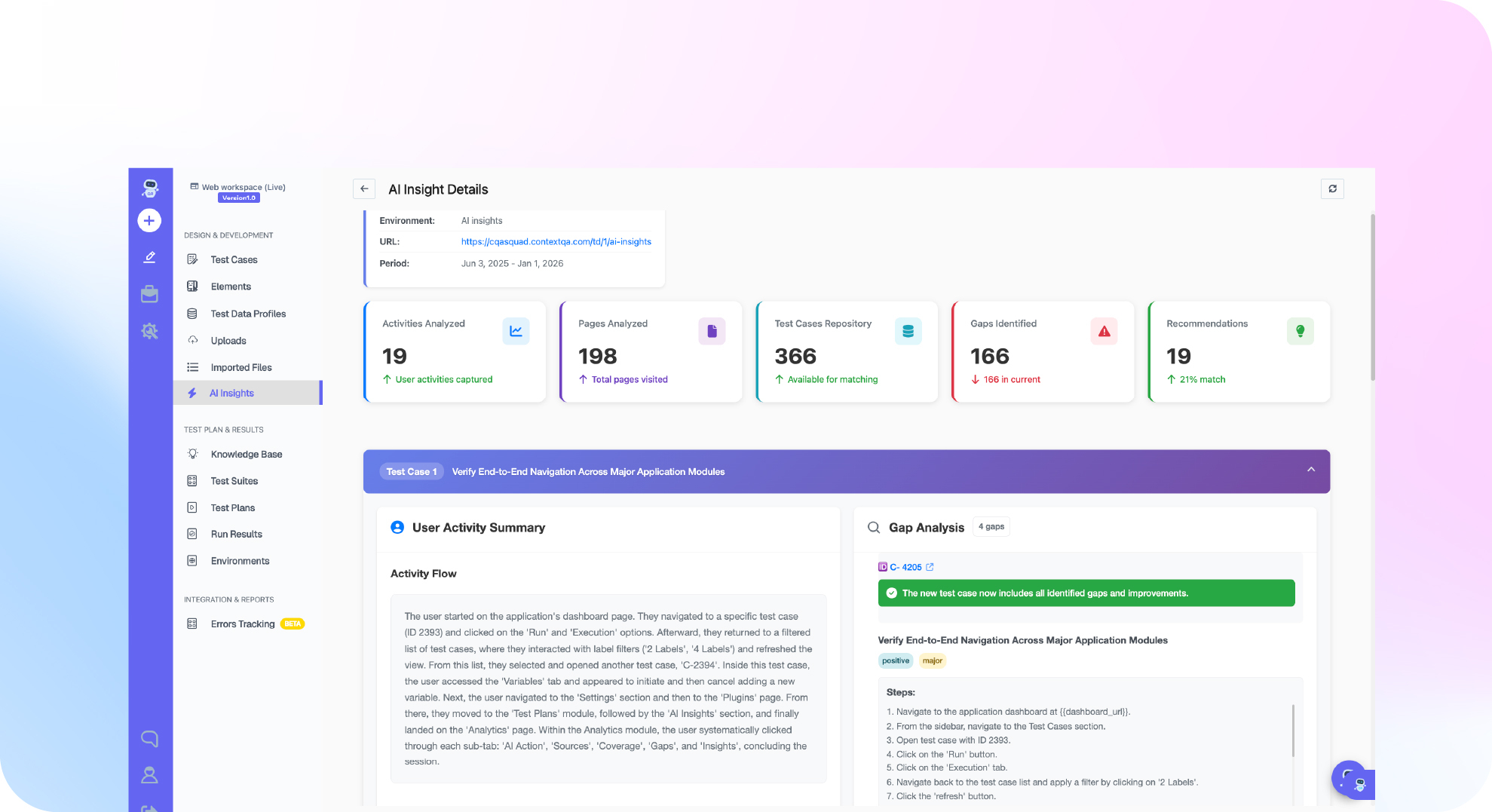
To be direct about our own position rather than describe it as “the AI”: ContextQA covers jobs one, two and three from the list above in one place. Tests are authored from plain-English descriptions, elements are identified with a multi-layer fingerprint across visual, accessibility, DOM and text signals so a renamed class does not break a test, and each failure is classified as a real bug, a test issue, an environment problem or a flake. It runs web, mobile and API suites together and connects to a pipeline, and an MCP server exposes those testing tools to coding agents like Claude and Cursor so a developer’s assistant can drive tests directly.
For scale as a reference point: IBM worked with ContextQA to migrate roughly 5,000 test cases and remove the flakiness that had been slowing that suite down (IBM case study).
What it does not do is the right-hand column above. It will not tell you which 12 of 200 possible cases matter for your business, and any vendor claiming otherwise is describing a roadmap.
Bottom line
Stop evaluating AI in QA as a category and start evaluating it job by job. Self-healing and failure triage are the two that pay for themselves fastest, because they attack recurring overhead rather than one-time work. Test authoring helps and is smaller than the demos suggest, because review is the bottleneck. Test data and coverage gaps change what you find rather than how fast you find it. And judgment, which is what deciding, prioritizing and exploring actually are, is not on the list.
Set a baseline before you adopt anything, because the METR result says your team’s impression of its own speed is not evidence. Then adopt the jobs, not the category.
Run the two-week plan with us instead of alone
If you would rather not spend week one wiring up a trial, bring three things to a demo: the flow that breaks most often, a recent nightly run with real failures in it, and your current maintenance hours. We author the flow from a description, run triage against those actual failures so you can check the classifications against what you already know the causes were, and you leave with a like-for-like comparison against your existing suite rather than a feature list. Thirty minutes, your application, no sample app.
Book a ContextQA DemoSources
- Stack Overflow Developer Survey 2025, AI section. Cited for 84 percent using or planning to use AI tools against 76 percent the prior year, 51 percent of professional developers using them daily, favorable sentiment falling from over 70 percent to 60 percent, 46 percent distrusting accuracy against 33 percent trusting it, 3 percent highly trusting, and the frustration figures of 66 percent for output that is almost right and 45 percent for debugging AI-generated code.
- METR, Measuring the Impact of Early-2025 AI on Experienced Open-Source Developer Productivity, 2025. Randomized controlled trial, 16 developers, 246 issues. Cited for the 24 percent forecast speedup, the measured 19 percent slowdown, and the 20 percent believed speedup afterward.
- Google Research, De-Flake Your Tests: Automatically Locating Root Causes of Flaky Tests in Code at Google. Cited for roughly 1.5 percent of test runs flaking and around 16 percent of tests affected over time.
- IBM case study, ContextQA. Cited for the migration of approximately 5,000 test cases.