
TL;DR: Testing insights are conclusions drawn from test results, failures, and real usage. They tell a team what to fix, what to test next, and whether a release is safe. The most useful ones separate real regressions from noise. Google reported in 2016 that about 1.5% of all its test runs returned a flaky result (Google Testing Blog, 2016). Ship, the ContextQA autonomous quality engineer, tests each pull request with impact analysis. For bugs reported in Jira, Linear or Slack, it reproduces the bug and hands engineers the likely root cause with evidence.
Most test suites are built from requirements and guesses, so the journeys real users take never get regression coverage. That gap shows up as escaped bugs in flows nobody scripted. This guide covers three things: building quality signals from CI data and real sessions, how ContextQA AI Insights groups captured sessions into activities, and how Ship acts on every pull request.
Quick answers
How do real user sessions turn into insights my team can act on? Group captured sessions into distinct user activities, flag the ones that hit console errors, and rank uncovered activities by how often users perform them. Compare that list with the flows your suite already covers. The ranked gaps tell you which test to write next.
How do these insights help decide what to run on a pull request? They tie a code change to the journeys and tests it is likely to affect, so you can run a targeted regression before merge instead of the full suite. Ship tests every pull request this way: impact analysis picks the relevant regressions, and engineers see the evidence before the code merges.
What should I do with a test that passes and fails on the same commit? Treat it as flaky, not as a regression. Quarantine it out of the merge gate, open a ticket, and check the usual causes: async waits, shared state, and test order dependency. Once flaky results are out of the signal, the remaining failures are worth reading.
What are testing insights?
Testing insights are the conclusions a team draws from test execution data, defect history, and real user behavior about where a release is actually at risk. They explain why tests fail, which user journeys have no coverage, and which failures are flaky noise. A metric only counts if it changes a decision.
Five signals separate a healthy suite from a noisy one:
- Escaped defects: production bugs no test caught, each traced back to the missing test.
- Flaky test rate: tests that both pass and fail on the same commit, which erodes trust in CI.
- Journey coverage: real user flows that have an automated test. Line coverage shows which code ran, not what was checked.
- Test effectiveness: defects caught before merge compared with defects found after release.
- Time to diagnosis: how long it takes to get from a red build to a root cause.
Ship works on the last two: targeted regressions on every pull request catch defects before merge, and for reported bugs it reproduces the issue and finds the likely root cause.
What can these insights do?
Quality insights turn run data, user sessions, and code changes into decisions: which tests to run, which failures are real, where coverage is missing, and why a build broke. They replace "rerun and hope" with evidence a QA lead can act on before a release.
The core capabilities:
- Change impact: Impact analysis maps a pull request's diff to the flows it touches, so targeted regressions run before merge. Ship does this on every PR.
- Bug reproduction: Ship reproduces bugs reported in Jira, Linear, Slack, or a service desk, then hands engineers the evidence.
- Root cause hints: Root cause analysis points engineers to the likely cause of a failure, so they spend less time triaging.
- Coverage gaps: comparing what users actually do with what your suite tests.
- ROI evidence: reruns avoided, triage time, and escaped defects per release, tracked against your own baseline.
When you compare tools, check whether each insight ends in an action (a test, a repro, or a fix) or on a dashboard.

Why do these insights matter in 2026?
Suites now run on every pull request, and raw pass and fail counts no longer show whether a release is safe. Good quality signals separate real regressions from noise, point to the likely root cause, and show which KPIs are slipping before customers find the defect. Flaky tests are one source of that noise.
Google reported that about 1.5% of all test runs gave a flaky result and almost 16% of its tests showed some flakiness (Google Testing Blog, 2016). An empirical study found async waits, concurrency and test order dependency were the top root causes (Luo et al., FSE 2014). The fixes: replace fixed sleeps with explicit waits, isolate shared state, and run tests in random order.
Three KPIs show whether those fixes are working:
- Defect escape rate: the share of defects found in production instead of before release.
- Mean time to detect (MTTD): the time between a commit and the discovery of its defect.
- Test cycle time: the time from triggering a suite to getting a result you trust.
Ship works on the first two by running targeted regressions before merge.
How does the insight loop work?
The loop connects signals from every test run, code change, and bug report, so a team can see what failed, why, and what to test next. It runs in four stages: capture, correlate, prioritize, and act. It works best inside the CI/CD pipeline, where release decisions already get made.
- Capture run data. Each CI job, such as a GitHub Actions workflow or a Jenkins pipeline, should emit
junit.xmlwith logs, screenshots, and console errors. For example,pytest --junitxml=junit.xmlorPLAYWRIGHT_JUNIT_OUTPUT_FILE=junit.xml npx playwright test --reporter=junit. - Correlate with change. Link each failure to the commit, pull request, or ticket behind it. A test that fails and then passes on the same SHA is flaky, not a regression.
- Prioritize by risk. Failures on signup, billing, and login come before cosmetic breaks.
- Act before merge. Ship runs impact analysis on every pull request and executes targeted regressions. For bugs from Jira, Linear, or Slack, it reproduces the issue and attaches the likely root cause.
For a SaaS startup, cover your top revenue flows first, then gate every pull request and let the data decide where coverage grows.
Which approach fits your team best?
The right approach depends on how often you release and who reads the results. Manual testing fits exploratory and usability work. Scripted automation fits stable regression paths. AI driven testing fits teams that merge daily and need evidence on every pull request. Choose for each flow by risk.
- Manual testing: exploratory and usability work on features still changing. Findings stay in testers' notes, so trends are hard to track.
- Scripted automation: stable regression paths in CI. Flaky tests and broken locators can hide the real failures.
- AI driven testing: more pull requests than reviewers can keep up with. Ship checks what each pull request affects, runs targeted regressions before merge, and attaches the likely root cause to bugs it reproduces.
- Dev agencies: one evidence package per client: the pull request, its regression run, and any bugs reproduced from Jira, Linear or Slack.
The short version: keep manual testing for discovery, automate what is stable, and let an autonomous quality engineer turn every merge into evidence.
How does ContextQA handle quality insights?
Ship, the ContextQA autonomous quality engineer, turns quality signals into evidence engineers can act on. On every pull request it runs impact analysis and targeted regressions before merge. When a bug is reported in Jira, Linear, Slack or a service desk, Ship reproduces the issue, finds the likely root cause, and hands engineers the evidence.
The workflow:
- Open a pull request. Ship works out which flows the change touches and runs only those regressions before merge.
- File the bug where your team already works. Ship reproduces the report from Jira, Linear or Slack and attaches the likely root cause.
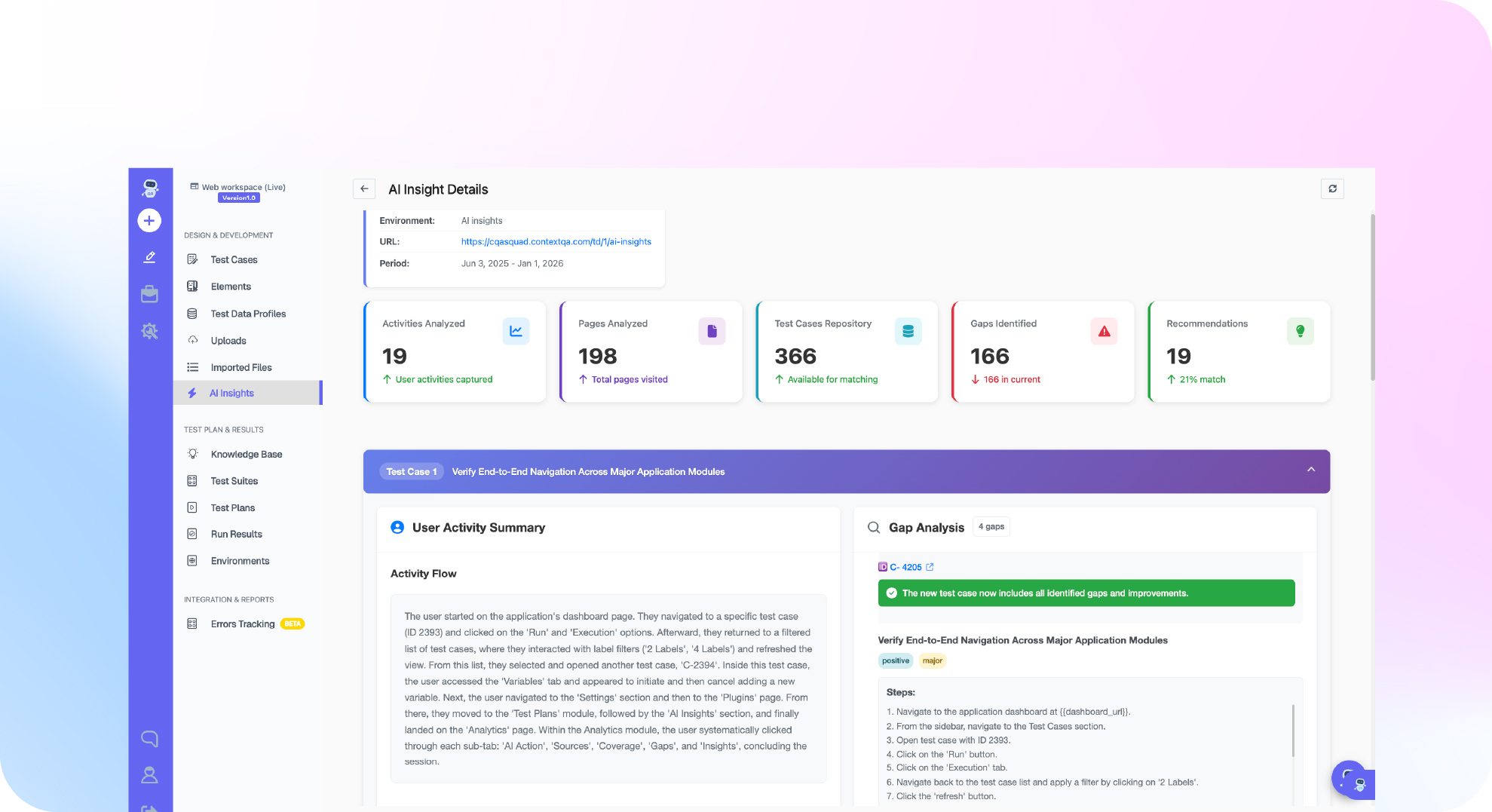
- Find gaps from real usage. The ContextQA learning center documents AI Insights: click New Session, choose a domain, and set a schedule. Each run groups captured sessions into activities, flags console errors, and reports which activities have no tests yet. From an activity, a crawl generates a requirement and test cases. Check the docs page to confirm which ContextQA workspace includes it.
Usability panels vs. Ship: usability panels tell you whether a flow is confusing. Ship tells you whether a code change broke a flow and why.
If your test suite covers flows real users never take and misses the ones they do, get started free with Ship, no credit card needed.

What should you do now? A checklist
Start with data you already have: CI failure history, flaky test logs, bug tickets, and console errors. Rank the gaps by user impact, run targeted checks on every pull request, and review trends each sprint.
- Export 30 days of CI runs from GitHub Actions or Jenkins. Tag each failure as a product bug, a flaky test, or an environment problem.
- Quarantine any test that fails and then passes on the same commit, and open a ticket for it.
- Confirm the five journeys your support queue mentions most each have a test.
- Link every staging console error to a ticket or a test.
- Run targeted regressions on each pull request before merge. Ship picks those tests from the code that changed.
- Send bug reports from Jira, Linear or Slack to Ship, and add a regression test before closing any reproduced bug.
- Review flaky test rate and escaped defects at every sprint retro.
Bottom line
AI Insights starts from what customers actually did in your application, not from what you assumed. It groups real sessions into activities, surfaces console errors, shows which activities already have tests, and lets you generate test cases for the rest. Ship then guards each pull request with targeted regressions and reproduces reported bugs with the likely root cause. For the bigger picture, read what an autonomous quality engineer is.
Sources
The flaky test statistics and root cause findings come from the primary sources below. Product workflow details come from the ContextQA learning center pages on AI Insights and crawl requirements.