TL;DR: To automate regression testing for checkout, split coverage into tiers: smoke and changed-area tests on every pull request, critical regression on release candidates, and full regression nightly. Trigger the pull request tier from a pull_request pipeline event. Seed payment tests with sandbox cards, fresh sessions, and single-use coupons so runs stay deterministic. Ship, the ContextQA autonomous quality engineer, maps each pull request's blast radius and runs targeted checkout regressions before merge.
Many teams that automate regression testing still ship broken carts, failed payments, and expired sessions. The cause is scope: each pull request either runs the full suite and waits, or runs a thin smoke check and hopes. This tutorial covers which checkout regressions to run per pull request, a working pipeline, safe payment test data, and how Ship maps a change's blast radius before merge.
Quick answers
Which checkout regression tests should run on every pull request instead of nightly? Run a smoke set (login, add to cart, one successful payment) plus a changed-area set tied to the code the pull request touches, such as coupon logic or session handling. Keep the full regression across browsers, devices, and longer-tail payment paths on a schedule or before a release decision.
How do I safely use payment test data in an automated regression pipeline? Use only fictional or approved non-production data, such as your payment provider's sandbox card numbers, and never real cards or live keys. Separate the checkout workflow from its inputs with a data-driven approach: one test runs across rows like valid card, declined card, expired coupon, and expired session. Keep credentials in your CI secret store, scoped per environment, so staging and production data never mix.
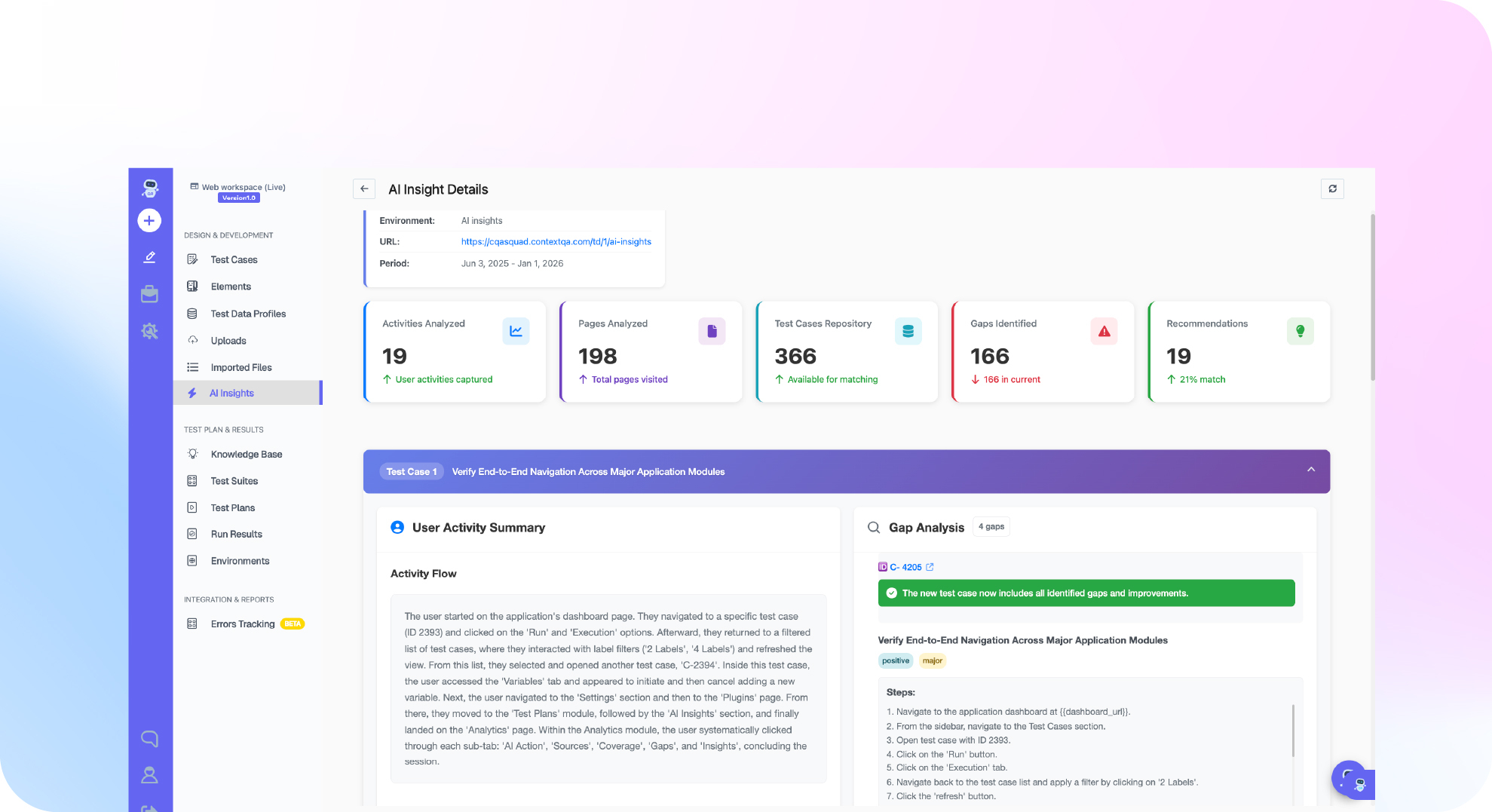
How does Ship decide which regression tests to run for a given pull request? Ship uses approved repository context from code analysis to map a pull request's likely blast radius, then runs targeted regressions on the affected flows before merge. If a change touches coupon validation, it focuses on the checkout paths that depend on it instead of running the entire suite. The output includes execution scope, evidence, and likely cause, and a reviewer still makes the merge decision.
What does it mean to automate regression testing, and when do you need it?
To automate regression testing is to rerun existing tests by machine after every code change, confirming that behavior which worked yesterday still works today. Automated runs are repeatable, triggered by events such as a pull request or a nightly schedule, and leave evidence each time. Checkout, payment, and session logic often break in code nobody touched directly.
The automate or manual decision comes down to stability and frequency:
- Automate flows that are stable, high traffic, and high risk: cart totals, coupon application, payment authorization, and the redirect after session expiry. These run on every pull request or release candidate.
- Keep manual exploratory checks on brand new UI, one-off visual judgment calls, and flows whose requirements still change weekly.
You need automation once full regression takes longer than your merge cadence, or when defects keep escaping into areas a change did not obviously touch. The ContextQA regression risk guide recommends smoke, changed-area, critical, and full regression portfolios so each run matches the decision it supports.
What do you need before you start?
Before wiring checkout regressions into Ship, you need four things: a reachable staging build, scoped repository access, safe payment test data, and a CI pipeline that fires on every pull request. Ship uses repository context and a reachable test application to map impact, while sandbox payment data and a pull request trigger keep runs deterministic and give you a merge gate you can trust.
- Staging environment: Ship crawls a reachable test application to build an initial product map of cart, payment, and coupon flows. See Run Ship Workflows.
- Repository access: Authorize GitHub or GitLab with the narrowest suitable scope, then confirm the repository, default branch, and deployed application.
- Payment test data: Use sandbox keys from your payment provider, fictional card numbers, and coupon codes that will not expire mid-run.
- A `pull_request` trigger: Use GitHub Actions, Jenkins, or another CI/CD tool. The test plan should pass one controlled manual execution before you wire it in.
- Tool choice: Open source browser frameworks give full control, but your team owns selector upkeep, flaky test triage, and deciding which tests each change needs. Ship adds pull request impact analysis and root cause evidence on top of execution.
Bottom line: Get staging, scoped repository access, and sandbox payment data in place before you write any pipeline YAML.
How do you set up checkout regression step by step?
Rank checkout flows by risk, automate the high-usage, high-priority journeys first, group them into suites by purpose, and trigger a targeted subset on every pull request. In practice that means cart, payment, coupon, and session expiry checks gate each merge, while full regression across browsers and devices runs on a nightly schedule or before release.
- Pick cases by risk. Plot usage frequency against business priority, then add defect history and integration criticality (Regression Risk and Evidence). Payment capture outranks a profile page.
- Split suites by purpose: smoke, changed-area, critical regression, full regression, and quarantine.
- Generate a baseline in Ship. Open Autonomous SDLC → Crawl, watch the AQE Terminal, review candidates once the crawl reaches a terminal result, and add negative paths such as expired coupons (Run Ship Workflows).
- Gate pull requests. Run repository analysis so Ship has change-impact context, then use the test plan CI / CD view to generate a provider-specific starting point. A minimal hand-written equivalent for a code-based suite looks like this:
on:
pull_request:
paths: ["src/checkout/**", "src/payments/**"]
jobs:
checkout-regression:
runs-on: ubuntu-latest
steps:
- uses: actions/checkout@v4
- run: npm ci && npx playwright install --with-deps
- run: npx playwright test --grep @checkout
- Quarantine flaky tests. Give each flaky test an owner and a review date.
What are the most common mistakes?
The most common checkout regression mistakes are running the full suite on every pull request, wiring unproven test plans into CI, sharing payment test data across parallel jobs, and quietly ignoring flaky failures. Each one either slows merges until engineers bypass the gate, or lets a real cart, coupon, or payment regression reach production customers.
- Full regression on every pull request: This blocks merges and trains developers to skip the check. Trigger smoke and changed-area plans on
pull_requestand keep full regression for scheduled or release candidate runs (regression risk guide). - Unvalidated plans in CI: The regression suite tutorial has you run the plan manually first and build suites from already-passing tests, so the pipeline's first failure is a real regression and not a setup error.
- Shared payment data: Parallel jobs hitting the same coupon or test card collide. Use data driven testing with one row per scenario.
- Silent quarantine: Flaky session expiry tests need an owner and a review date.
Bottom line: Scope each run to the decision it supports, and only gate merges with plans you have already proven.
How do you know it is working?
Your regression pipeline is working when checkout defects stop reaching production, pull request feedback arrives before review ends, and each failure comes with evidence pointing to a cause. Track change failure rate, time to a trusted signal, flaky test rate, and maintenance hours per sprint, and compare each against your pre-automation baseline.
The cost case for catching defects earlier is long established. NIST estimated that inadequate software testing cost the US economy $59.5 billion a year, and that $22.2 billion could be recovered through improved testing infrastructure (NIST, 2002).
Measure these four signals on Monday:
- Change failure rate: the share of deployments that cause a production failure, one of the DORA metrics (DORA). Checkout incidents should trend down.
- Flaky rate: the share of test runs or cases that fail intermittently without a code change, with each quarantined case given an owner and review date.
- Evidence completeness: each Ship run should record the source signal, execution scope, evidence, likely cause, and reviewer decision (Ship workflows).
- ROI: subtract maintenance hours and runner costs from the hours you no longer spend on manual checkout passes and incident response.
How do you automate regression testing with ContextQA?
Ship, from ContextQA, works from the pull request: it analyzes your repository, maps which flows a code change touches, and runs targeted checkout regressions before merge. Failures come back with evidence and a likely root cause. You wire it into CI through a test plan's CI / CD view, per the Ship workflows docs.
The documented path:
- Authorize GitHub or GitLab with the narrowest repository scope that works.
- Confirm the repository, default branch, and deployed application, then start code analysis.
- Review generated candidates for cart, payment, coupon, and session expiry flows before adding them to shared regression coverage.
- Open a test plan that already passed a controlled manual run, and use CI / CD to generate a provider-specific starting point for your CI tool, such as GitHub Actions.
Code analysis does not approve or merge a pull request. A reviewer still makes that decision. Watch Ship catch a checkout regression before merge.
If checkout regressions in cart, payment, session expiry or coupons keep slipping past pull request review, get started free with Ship, no credit card needed.

What should you do right now?
This week, pick the pull request scope first, then wire it into CI. Separate smoke, changed-area, and release candidate suites, seed deterministic payment test data, gate merges on targeted checkout checks, and quarantine flaky cases with an owner. Then connect Ship so each pull request's blast radius is mapped before anyone clicks merge.
- Run each checkout test once on its own before adding it to a suite, so the first failure is a real regression.
- Add session expiry and expired coupon negative cases to the critical regression set.
- Trigger the changed-area plan on
pull_requestand block merge on failure. - Move flaky or data-blocked cases to quarantine with an owner and review date. Do not retry them silently.
- Read Ship's evidence and likely cause before rerunning any failed check.
Bottom line
Checkout regressions are cheapest to catch before merge, so run a changed-area suite on every pull request and save critical and full regression for release candidates and nightly runs. Keep payment data fictional and environment scoped. If AI assistants write your cart code, add an AI generated code testing checklist, and extend coverage with automated mobile testing.
Sources
These primary sources back the cost, metrics, and workflow claims. ContextQA documentation is linked inline where each product step appears.