
TL;DR: ERP test automation runs scripted or AI generated checks against ERP workflows such as order to cash, procure to pay, and financial close. For lead to cash, it confirms that every system shows the right result: the Salesforce opportunity, the SAP or Oracle order, the shipment, the invoice, and the status sent back. Useful tests link records with stable correlation keys and cover retries, timeouts, and partial shipments. ContextQA, the autonomous quality engineer, automates these cross system journeys and repairs broken selectors itself when the UI changes.
Most ERP tests stop at the system boundary. A Salesforce opportunity can show closed won while the ERP order, shipment, or invoice never arrives correctly. This guide covers how to map the real integration, trace correlation keys, reconcile orders and invoices, and test failure paths before release.
Quick answers
How do you test a lead-to-cash process that spans Salesforce and an ERP? Link the Salesforce opportunity or quote to the ERP order, fulfillment, invoice, and returned status with a stable business correlation key. Then reconcile the whole chain. Check each system's result and the integration boundary between them, because a success in Salesforce does not prove the downstream order exists. Use the SAP or Oracle path your architecture actually runs.
Which integration failure cases should an ERP test suite cover? Cover missing customer or product mappings, integration timeouts, retries of the same event, partial shipments, expired or unauthorized identities, and source records amended after handoff. Each case needs an explicit expected result: an exception queue instead of an order for the wrong item, no duplicate order on retry, and a visible failure instead of a false completed status.
How do you reset ERP test data between automated runs without corrupting financial records? Create synthetic customers, products, and pricing for each run, and record every document reference the run creates. Afterward, reverse those records through approved business procedures such as cancellations, credit memos, or stock reversals. Never delete accounting or inventory records directly, because that breaks audit trails and hides real reconciliation defects.
What is ERP test automation?
ERP test automation uses software to create, run, and maintain tests for enterprise resource planning workflows such as order to cash, procure to pay, and record to report. Every vendor patch, configuration change, or integration release gets checked before it reaches finance and operations users, so nobody re-keys the same transactions by hand each cycle.
ERP tests differ from typical web tests in three ways. They cross modules and systems, they depend on master data and user roles, and they fail on business results rather than screens. A sales order can save cleanly and never produce an invoice, and a screen only check will pass it.
The pattern is the same for SAP, Oracle, and Microsoft Dynamics 365: map the real process, use synthetic data, and assert every document reference with a stable correlation key, one ID that follows the transaction through every system. The ContextQA platform tests SAP Fiori, S/4HANA, and SAP GUI workflows end to end on the Enterprise plan, and it also covers Oracle flows. If you need Dynamics 365, ask about those modules before you buy.
What can automated ERP testing do?
Automated ERP testing runs complete business processes, such as order to cash and procure to pay, without anyone clicking through screens by hand. On every release, including vendor upgrades and quarterly patches, it checks screens, documents, roles, and integration handoffs, so teams find broken mappings and postings before users do.
- Cross system journeys: Follow one commercial event from a Salesforce opportunity to the ERP order, shipment, invoice, and returned status, matched by a stable correlation key (lead to cash guide).
- Upgrade regression: Rerun the critical process suite before a quarterly release or S/4HANA upgrade. ContextQA also offers impact analysis.
- Failure path coverage: Confirm that timeouts, retried events, missing mappings, and partial shipments end in a traceable state and never create duplicate orders.
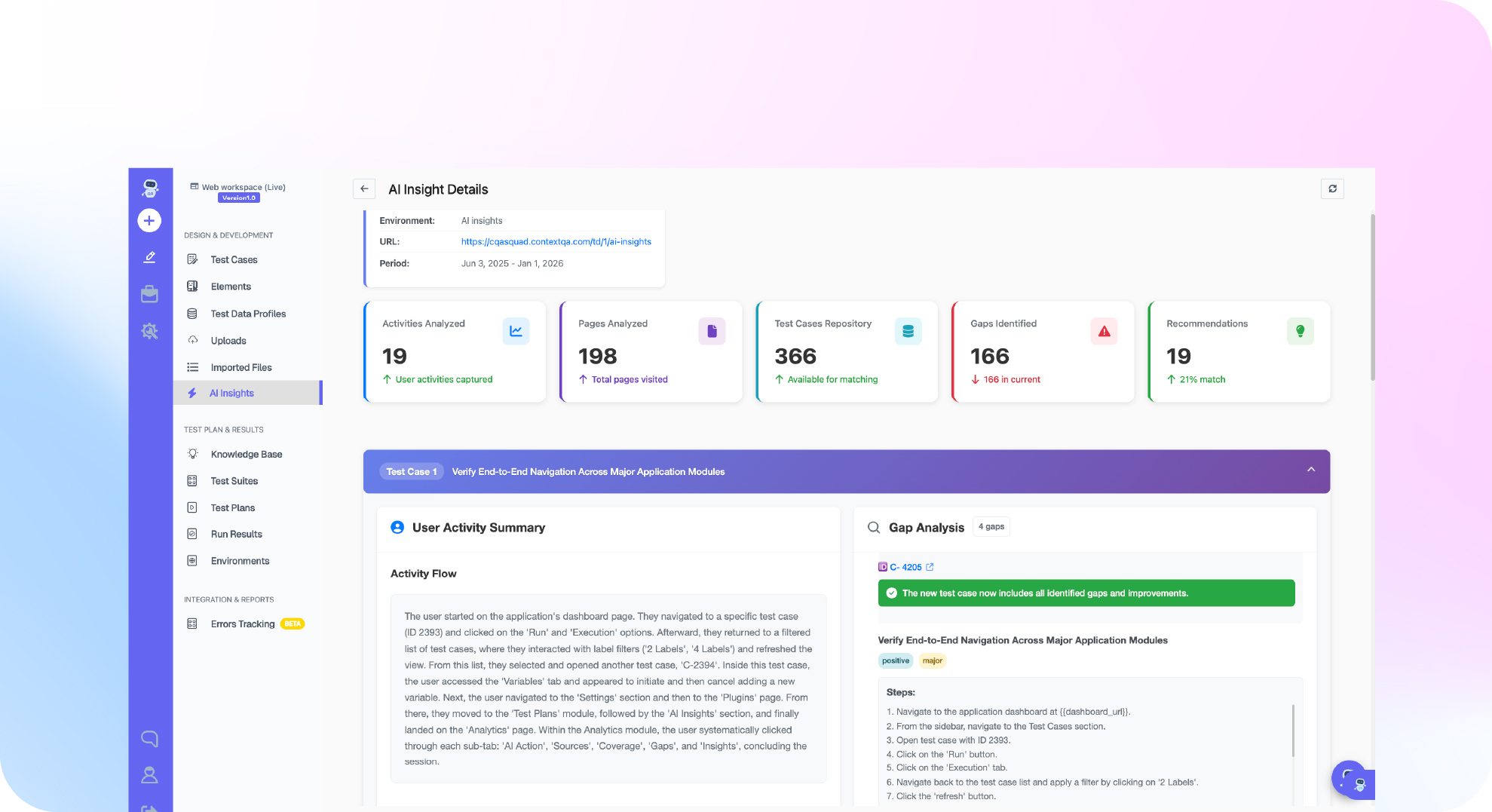
- No code authoring: Testers without coding skills author and run tests with the no code recorder, and self healing repairs broken locators when screens change.
- Pipeline runs: Trigger suites from Jenkins or GitHub Actions, then export to Playwright when engineers want to own the code.

Why does ERP testing matter in 2026?
Automated ERP testing matters in 2026 because migration deadlines and vendor release schedules move faster than manual regression can keep up. SAP S/4HANA migrations are in active test cycles, and each scheduled cloud update can break an order to cash flow that nobody retested.
- SAP, 2020: mainstream maintenance for SAP Business Suite 7 core applications runs through the end of 2027 (SAP News).
- CISQ, 2022: poor software quality cost US organizations an estimated $2.41 trillion (CISQ report).
Three problems keep ERP suites hard to automate:
- Dynamic UI: when Fiori or Lightning screens or element IDs change, recorded selectors can break.
- Integrations: a Salesforce opportunity marked "Closed Won" does not prove the ERP order or invoice exists. Tests have to reconcile both systems on shared business IDs.
- Customizations: custom fields and approval rules differ for every tenant, so generic vendor scripts rarely fit.
How does an automated lead to cash test work?
An automated lead to cash test scripts a business process across every system it touches and reruns it on each release. It seeds synthetic data, drives the transaction, captures a correlation key, and checks that orders, invoices, and statuses match everywhere, including when integrations fail.
- Map the real architecture. Document each source event, integration route, and return path. Flag interfaces that need an approved stub.
- Prepare synthetic data. Create a test customer, product mapping, and authorized roles in each system.
- Drive the journey and capture keys. Run the transaction, such as a Salesforce quote that becomes an SAP order, and record a correlation key at each handoff.
- Assert downstream and failure states. Verify amounts and status in every system, then force timeouts, retries, and missing mappings to catch duplicates or false completed states (lead to cash guide).
- Run it in CI/CD. Trigger suites from Jenkins or GitHub Actions on every ERP configuration change and report to Jira or Slack.
- Reset through business procedures. Reverse run records with approved transactions so UAT cycles stay repeatable.
Which approach fits your team best?
The right approach depends on who writes tests and how often the ERP UI changes. Code first teams with SDET capacity can own an open source framework. Mixed teams testing cloud ERP, where the vendor ships UI updates on its own schedule, need self healing and no code authoring so suites survive releases.
| Approach | Best for | Pricing model | Notable tradeoff |
|---|---|---|---|
| Hand coded WebDriver framework | Teams with dedicated SDETs | Free license, paid in engineering hours | Locators break on ERP UI updates |
| Hand coded Playwright | Code first teams on browser ERP front ends | Free license, paid in engineering hours | Browser only, so no SAP GUI |
| Legacy record and playback tools | Quick smoke scripts | Per seat license | Recordings get redone after UI changes |
| ContextQA platform | Mixed QA teams covering SAP, Salesforce, Oracle, Workday | Demo and quote | SAP coverage requires the Enterprise plan |
Verdict: Use a framework if you have SDETs to maintain selectors, data resets, and cross system checks after every release. Use ContextQA when ERP UI changes and cross system workflows cost more in maintenance than in authoring.
How does ContextQA handle cross system ERP testing?
ContextQA tests ERP workflows on its enterprise platform, covering SAP Fiori, S/4HANA and SAP GUI (Enterprise plan), Oracle, and Workday end to end. The platform's no code UI and recorder let testers without coding skills author and run tests, self healing repairs broken locators when screens change, and runs start from Jenkins or GitHub Actions on every release.
A cross system run follows the lead to cash guide:
- Approve a Salesforce opportunity for a synthetic customer and record its correlation key.
- Check that the ERP order has the correct customer, items, quantities, amounts, and currency.
- Fulfill the order, then check the shipment, the invoice, and the status sent back to Salesforce.
- Test a missing product mapping, an integration timeout, and a retried event that must not create a duplicate order.
It checks the integration boundary, not just one UI, and exports tests to Playwright. It deploys as cloud SaaS, in your own cloud, self hosted, or on premises.
If you can't prove that a closed Salesforce opportunity becomes the right ERP order, invoice, and returned status, book a demo to see ContextQA test that chain end to end, or read about enterprise apps testing.

What should you do now? A checklist
Start with one revenue critical journey, such as lead to cash, mapped across every system it touches. Automate it end to end with stable correlation keys, add failure cases, and run it on every release.
- Document the source event, middleware, transformation, destination module, and return path.
- Choose SAP or Oracle based on your actual architecture. Do not assume you run both.
- Seed synthetic customers, product mappings, and authorized roles in each system.
- Automate the happy path: approved quote, ERP order, shipment, invoice, returned status.
- Retry the same event and confirm that no duplicate order appears.
- Ship part of an order and check that remaining quantity, invoice amount, and status agree.
- Run the suite in Jenkins or GitHub Actions, with results reported to Jira or Slack.
Bottom line
A green status in Salesforce does not prove that the ERP order, shipment, and invoice behind it are correct. Test the whole lead to cash chain with a stable correlation key, assertions in every system, and planned failure cases, then reconcile each run so one commercial event produces one order. For wider strategy, see enterprise application testing and what test automation is in software.
Sources
The statistics in this article come from the primary sources below, and the workflow steps come from the ContextQA lead to cash guide. Check each link before reusing a figure, because maintenance dates and published estimates can change.