
TL;DR: Pull request impact analysis testing maps the files and functions changed in a pull request to the tests that cover them. You then run only the affected tests before merge instead of the full regression suite. Research at Meta found that predictive test selection caught over 99.9% of faulty changes while running about a third of dependent tests (Machalica et al., 2019). Ship, the ContextQA autonomous quality engineer, attaches a confidence level and code change evidence to each recommended test, so a reviewer approves the scope before it runs.
Most teams pick regression tests by name or from memory. That misses affected flows and keeps pipelines slow. This guide covers how to map a pull request to the tests it touches, how to judge confidence and evidence, and how to scope a regression run before merge without rewriting your release process.
Quick answers
What is pull request impact analysis testing? It maps the code changes in a pull request to the tests they could affect, so a reviewer runs a targeted regression scope instead of the full suite. In Ship, each impacted test carries code change evidence and a confidence level for review (PR Impact Analysis docs).
How do I know whether a recommendation is trustworthy enough to skip the full regression suite? Check the confidence and the evidence, not the test names. In Settings → PR Impact Analysis, set a Confidence threshold. Recommendations below it are held back. The report also shows whether each match came from structural application mapping or from semantic test knowledge.
Will impact analysis change my tests or block merges without approval? Not in the initial rollout. The Read setting of the Autonomy tier produces an advisory report and makes no test changes. You choose report only, run after merge, or run before merge. The feature is in limited rollout, so ContextQA may need to enable it first.
What is pull request impact analysis testing, and when do you need it?
Pull request impact analysis testing maps the files and functions a pull request changes to the tests that exercise them, then runs only those tests before merge. You need it when your full regression suite is too slow to run on every pull request, but skipping tests lets regressions reach main.
It works in two steps. First, the tool builds a map between application code and tests. The map is either structural (which modules and routes a test touches) or semantic (what the test's steps and requirements describe). Second, it compares the diff to that map and returns each affected test with the code change that links it and a confidence level.
That evidence is what separates it from picking tests by name. In Ship, repository code analysis builds the map. The PR Impact Analysis report groups impacted tests by verdict and shows why each one was included.
What do you need before you start?
Before you run PR impact analysis in Ship, you need four things: the feature enabled for your workspace, an authorized GitHub or GitLab repository, a finished code analysis of that repository, and a test suite whose environment settings point at the build under review. If any one is missing, the recommended regression scope is weaker.
- Workspace access: PR Impact Analysis is in limited rollout. Settings → PR Impact Analysis may not appear until ContextQA turns it on and connects an eligible repository.
- Repository authorization: Authorize GitHub or GitLab with the narrowest scope that works. Then confirm the repository, default branch, deployed application, and organization boundary.
- Code analysis: Run it first. It gives Ship the repository context it needs to connect changed code to tests.
- Tests worth mapping: Change based selection only reduces escaped defects when your suite covers the critical flows. Compare the flows Ship discovers with your existing tests, and fill the gaps.
- Environment hygiene: Remove fixed URLs and define the environment variables your tests need. The report flags both, because either one stops impacted cases from testing the intended build.
How do you run PR impact analysis step by step?
Connect your repository, set the analysis boundary, and open a pull request. Then review the report of affected, reusable, and missing tests, and run only the high confidence scope before merge. Keep the full regression suite on a nightly schedule so the targeted run is never your only safety net.
- Analyze the repository. Authorize GitHub or GitLab with the narrowest repository scope, then start code analysis (Ship workflows).
- Set the boundary. Open Settings → PR Impact Analysis. Choose report only, run after merge, or run before merge. Then set the confidence threshold (PR Impact Analysis docs).
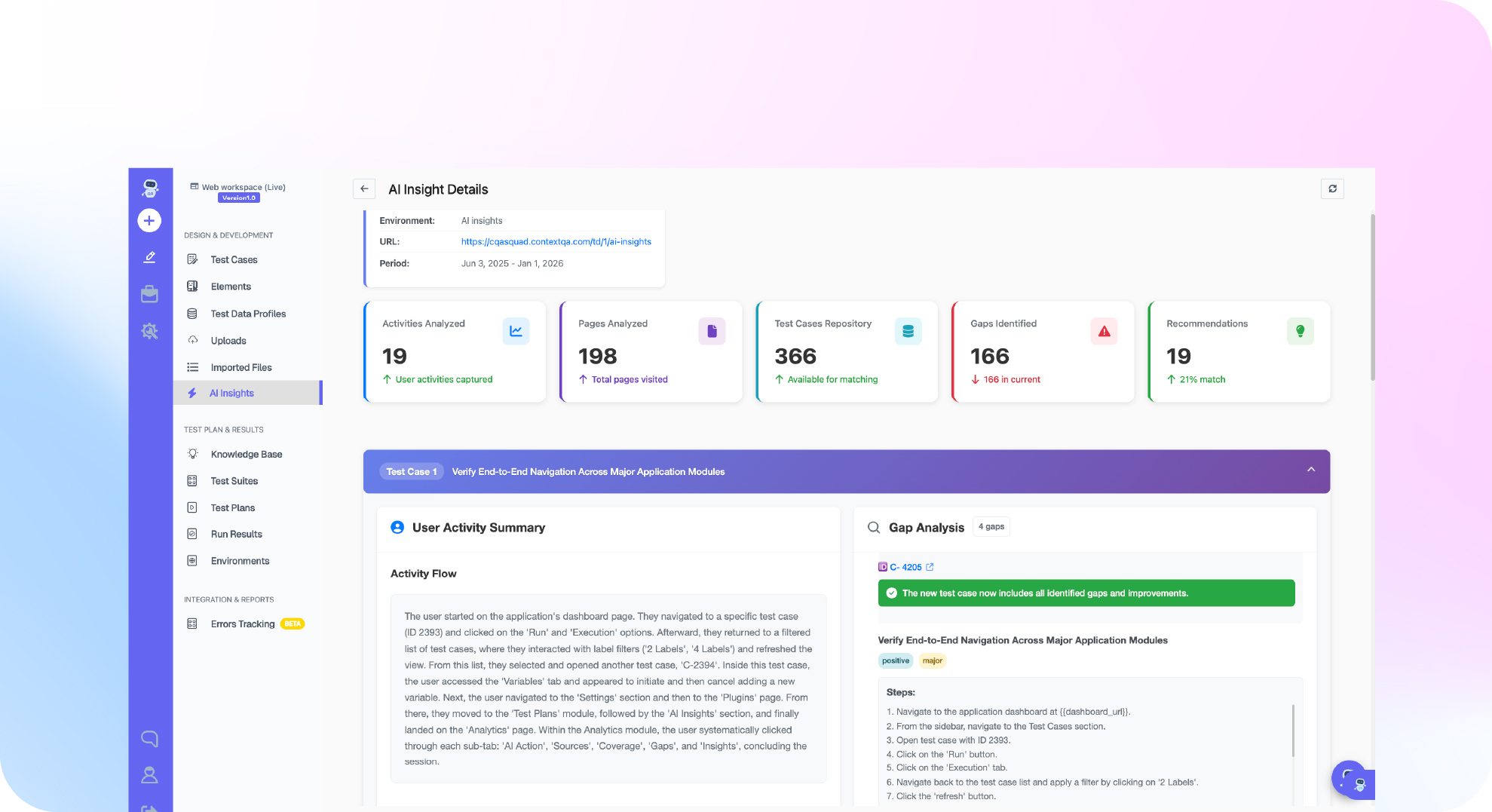
- Read the report. Expand each row to see the code change evidence and the confidence level. Fix any fixed URLs or missing environment variables the report flags.
- Check the diff. Make sure the files the report cites match the files you actually changed:
git fetch origin main
git diff --name-only origin/main...HEAD
- Connect CI/CD. Open a test plan that has passed a controlled manual run. Its CI / CD view generates starter configs for GitHub Actions, GitLab CI, Bitbucket Pipelines, Azure Pipelines, CircleCI, and Jenkins.
- Run the full regression nightly. Targeted runs give you faster feedback on each pull request. The full suite catches anything the mapping misses.
What are the most common mistakes?
The most common mistakes are trusting low confidence matches, running selected tests against the wrong build, judging tools by mapping claims instead of evidence, and measuring return on investment by tests skipped rather than defects caught before merge. Each one turns a targeted regression run into a false green check.
- Overriding the confidence threshold: Recommendations below the threshold are held for review on purpose. Read the code change evidence before you promote a held test into the run.
- Testing the wrong build: A hardcoded URL or a missing environment variable can stop impacted cases from testing the build under review. Fix both before you trust a pass.
- Comparing tools on selection alone: Ask whether each recommendation explains why the test was included, and whether the match came from structural mapping or from semantic test knowledge.
- Measuring ROI by skipped tests: Track pipeline minutes per pull request, regressions caught before merge, and escaped defects that trace back to a test the tool did not select.
- Skipping the Read tier review: Start in the Read tier, which produces an advisory report and makes no test changes, and compare its picks against your full suite.
How do you know it is working?
Change based test selection is working when the selected subset catches the same failures a full regression would, reviewers get a verdict sooner, and flaky reruns drop. To check, run the recommended scope next to your full suite for several sprints. Then compare missed failures, time to verdict, and rerun counts.
Flakiness matters here because it hides real misses. Google reported that about 1.5% of all its test runs gave a flaky result, and almost 16% of its tests showed some flakiness (Google Testing Blog, 2016). If a flaky test fails in the full run, that tells you nothing about whether the selection was right.
While you stay in the Read tier, track these for each pull request:
- Miss rate: failures in the full run that the report did not flag.
- Held recommendations: tests below your
Confidence threshold. A high count points to weak test mapping. - Evidence acceptance: whether reviewers agree with the code change evidence in each expanded row.
Move to pre merge runs only after your miss rate stays at zero for a full release cycle.
How do you automate pull request impact analysis testing with ContextQA?
Ship, the ContextQA autonomous quality engineer, automates this in three moves. It maps each GitHub or GitLab change to the tests it affects, explains every recommendation with a confidence score and code change evidence, and runs the targeted regression before or after merge. You choose the mode in Settings → PR Impact Analysis.
- Authorize the repository and run code analysis so Ship has repository context (Ship workflows).
- In Settings → PR Impact Analysis, choose the mode, the execution environment, and the deployment timing.
- Set the
Confidence threshold. Ship holds back any recommendation that scores below it. - On each pull request, expand a report row. It shows the evidence, the confidence score, and the match source. It also includes a generated MCP prompt you can give to an AI coding agent connected through the ContextQA MCP server.
The report also flags fixed URLs and missing environment variables, since either one can stop a pull request run from testing the intended build. When you evaluate any test selection tool, ask whether it shows this evidence for every test it selects.
Tired of running the full regression suite on every pull request because you can't tell which tests a change touches? Get started free with Ship. No credit card needed.
What should you do right now?
Start with one repository. Connect it to Ship with the narrowest access scope, run code analysis, and turn on PR impact analysis in the Read tier. Then compare its recommendations with the tests your team picks by hand on a few pull requests before you rely on it for regression scope. Your release process stays the same.
- If Settings → PR Impact Analysis is missing, ask ContextQA to enable it.
- Authorize GitHub or GitLab and confirm the repository, default branch, and deployed application.
- Start code analysis and record its analysis identity and status.
- Set Autonomy tier to Read and set a
Confidence threshold. - Fix any hardcoded URLs or missing environment variables the report flags.
- Expand each impacted test and check its evidence against the tests your team would have picked by hand.
Bottom line
Impact analysis on pull requests replaces guesswork with evidence. Each change maps to the tests it affects, every recommendation carries a confidence level and code change evidence, and a reviewer sets the scope before merge. Ship keeps the report advisory in the Read tier, which is the initial rollout. Pair it with an AI generated code testing checklist and root cause analysis in software testing.
Sources
The external sources below back the statistics on flaky tests and predictive test selection cited in this guide. All ContextQA product behavior described here, including settings, autonomy tiers, and report contents, comes from the linked ContextQA documentation pages.