
TL;DR: To automate Salesforce regression testing with AI, write test steps around accessible labels and business outcomes instead of generated Lightning IDs, and let self healing repair broken locators after each release. Salesforce ships three major releases a year (Winter, Spring, Summer) plus continuous patches (ContextQA Salesforce Testing Overview), and any of them can break selector based scripts. ContextQA, the autonomous quality engineer, reuses an authenticated session, combines UI and API checks, and runs risk prioritized suites on a schedule or from CI/CD.
To automate Salesforce regression testing with AI, plan for seasonal releases: self healing repairs broken selectors and locators when the UI changes, and your team reviews the healing evidence after each release. Lightning regenerates element IDs, standard selectors do not cross shadow DOM boundaries by default, and permission changes break flows that passed last week. This guide shows how to build a risk based regression suite in ContextQA, reuse authenticated sessions, apply self healing, and schedule nightly runs that leave auditable evidence.
Quick answers
How do I keep Salesforce regression tests from breaking after the Winter, Spring, and Summer releases? Write steps around accessible labels, roles, and business outcomes, not generated Lightning IDs. ContextQA records more element metadata than a single locator, and its self healing repairs broken selectors when the UI changes. After each release, review the healing evidence and add API validation where the screen alone proves nothing (overview).
Should we run the full Salesforce regression suite on every change, or only a subset? Match the scope to the decision. Run smoke and changed area plans from CI/CD on pull requests, critical regression on release candidates, and full regression on a schedule. The risk based testing (RBT) view plots usage frequency against business priority to define the critical tier (risk guide).
How do we handle Salesforce logins and test data so each regression test stays focused and maintainable? Create one session login test, set it as a prerequisite for dependent cases, and store credentials in protected parameters. Authentication maintenance then lives in one place. Drive record variations such as stages, price books, or case priorities from test data instead of duplicating cases (workflows).
What is AI driven Salesforce regression testing, and when do you need it?
AI driven Salesforce regression testing uses a platform that generates, runs, and repairs regression tests for your org's business workflows and keeps evidence for every run. You need it when seasonal releases, patches, and your own Flow, Apex, and permission changes break selector based scripts faster than your team can fix them.
Salesforce is harder to automate than a typical web app. Lightning generates element IDs programmatically, and Lightning Web Components and Aura sit behind shadow DOM boundaries (isolated component markup that standard selectors do not cross by default). A locator that passed last week can point at nothing after a release (ContextQA Salesforce Testing Overview).
When you evaluate tools, check four things: shadow DOM handling, reuse of an authenticated session, verification through both UI and API, and run evidence for every execution. The setup below follows that order: a session login prerequisite, then a suite, a test plan, and a schedule (regression suite tutorial).
What do you need before you start?
You need five things: a ContextQA workspace with a sandbox environment, a reusable session login test, one test user per profile and permission set you cover, seeded test data, and steps written around labels instead of locators. Without them, early failures come from setup problems rather than from real regressions in your org.
- Workspace and environment: Configure an environment with your sandbox base URL. Have at least three test cases that pass individually before building a suite.
- Session login prerequisite: Create a Salesforce session login test and select it as a prerequisite for dependent cases, with credentials and authenticator material in protected parameters (workflows).
- Profile and permission set users: Flows, Apex triggers, and field visibility behave differently per user, so create one test user for each combination you cover.
- Seeded records: Load the leads, opportunities, and price books your tests need, and reload them after every sandbox refresh.
- Label based steps: Write steps against labels and roles, then review the self healing evidence after each seasonal release.

How do you automate Salesforce regression testing with AI, step by step?
Seed a sandbox with known data, build a reusable session login test, and generate outcome based tests from a ticket, a user flow, or a recorded journey. Group them into a regression suite, attach a test plan with a browser and an environment, schedule it nightly, and review self healing evidence after each seasonal release. The six steps below follow that order.
- Create a sandbox and load fixture records. Every run then starts from the same Accounts and Opportunities.
sf org create sandbox --name qareg --license-type Developer \
--target-org prod --alias qa-sbx --wait 30
sf data import tree --plan data/regression-plan.json --target-org qa-sbx
- Create a session login test. Keep credentials in protected parameters and set the test as a prerequisite for dependent cases (Salesforce workflows).
- Generate cases from a user flow, ticket, or recorded journey. Assert the outcome, not just the screen: the new stage, its history entry, and fields your Apex triggers calculate. Run each case alone once so the suite starts from passing tests.
- Create the suite. Click Test Development, open Test Suites, click + Create Test Suite, and name it
Regression_Salesforce(tutorial). - Schedule a test plan. Point it at the sandbox environment and a browser, run it once manually, schedule it nightly, and route failures to Slack.
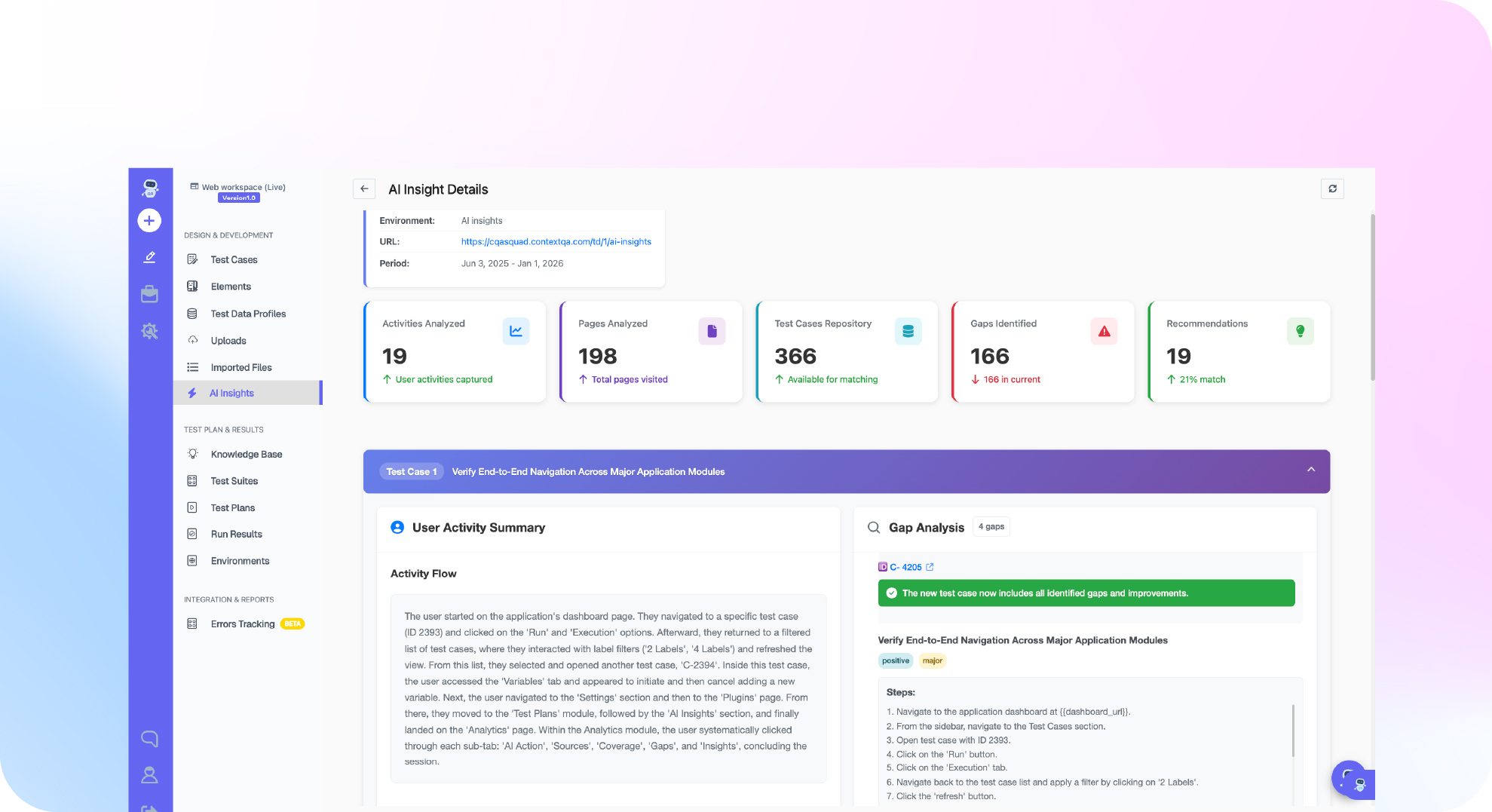
- Review self healing evidence after each release. Legacy record and playback tools often tie each step to a generated Lightning ID. ContextQA captures richer element metadata, so steps can survive ID changes (overview).
What are the most common mistakes?
The most common mistakes are automating screens instead of business outcomes, relying on generated Lightning IDs, running full regression on every change, and skipping review of self healing evidence after a seasonal release. Each one turns an AI suite back into the brittle, slow script pile it replaced, and each one weakens the case for the investment.
- UI only happy paths: A green Lightning page does not prove a Flow or Apex trigger fired. Assert the stage, history entry, and calculated fields, and add API validation (Salesforce workflows).
- Testing as one admin user: System Administrator runs hide failures caused by profiles and permission sets. Run critical journeys under real user profiles.
- Full regression on every pull request: Trigger smoke or changed area plans from GitHub Actions or Jenkins, and save full regression for scheduled runs (regression risk).
- Unreviewed healing: Check the self healing evidence before you trust a pass after a release.
- Measuring only hours saved: Also track script maintenance effort and defects that escape to production.
How do you know it is working?
The program works when the regression run after each Salesforce release or sandbox refresh fails only on real defects, someone reviews the self healing evidence, and every go or no go call has run evidence attached. If most failures still come from broken locators, the suite is not doing its job yet.
Measure per release window, not per quarter, because the platform changes three times a year plus patches (ContextQA Salesforce Testing Overview). Apex unit test coverage is a deployment gate, but it covers code paths, not whether lead to opportunity or quote to order still works end to end.
Track three signals:
- Failure source: failures caused by the product versus by the test itself.
- Healing review per release: whether someone reviewed the self healing evidence before the team trusted a pass.
- Critical journey coverage: journeys placed in the RBT view's high frequency, high priority area (Regression Risk and Evidence).
When comparing approaches, compare maintenance hours per release. With selector based scripts, your team maintains the locator fixes itself.
How does this look inside ContextQA?
In ContextQA, you build a session login prerequisite, author Lightning steps in natural language or with the no code recorder, group cases into a regression suite, and run it from a test plan on a schedule or from CI/CD. Self healing repairs broken locators, and each run keeps evidence for review.
- Reuse the login across every dependent case (Salesforce and Enterprise Workflows).
- Check outcomes, not screens. For a stage change, assert the new stage, its history entry, and calculated fields, with API validation where the UI cannot prove the result.
- Attach the suite to a test plan that defines environment, browser, schedule, parallelism, and notifications (regression suite tutorial).
- Watch the demo to see how steps respond to platform change (demo video).
If every Salesforce seasonal release breaks your Lightning selectors and stalls regression, book a demo to see ContextQA's self healing tests on your workflows, or read about enterprise apps testing.

What should you do right now? A checklist
Start small and verifiable. Reuse one authenticated session, cover your highest risk business lifecycles, check outcomes through both the UI and the API, and schedule the suite before the next seasonal release. A Salesforce test automation platform earns its place only when each item below produces run evidence your team can actually review.
- Create a session login test and set it as a prerequisite (workflow guide).
- Store credentials and authenticator material in protected parameters.
- Map lead to opportunity and opportunity to quote for each critical profile and permission set.
- Write steps against labels and roles, not generated Lightning IDs.
- Add API assertions wherever Flows or Apex triggers update records off screen.
- Run each case once alone so the suite starts from a passing baseline.
- Group cases into
Regression_Salesforceunder Test Development > Test Suites (tutorial). - Build a test plan with sandbox environment, browser, nightly schedule, and Slack alerts.
- Place each case in the RBT view by usage and priority (risk guide).
- Review self healing evidence after every Winter, Spring, and Summer release.
Bottom line
Salesforce regression breaks in predictable places: regenerated Lightning identifiers, permission differences across profiles, and Flows or Apex triggers that change records off screen. Design for those. Reuse a session, test business outcomes, back UI checks with API validation, and review healing after every release. For suite organization, see automating regression testing; for SAP, Oracle, and Workday, see enterprise application testing.
Sources
Every product step in this guide comes from ContextQA's public documentation and demo video. The release cadence and Lightning DOM behavior come from the ContextQA Salesforce Testing Overview, listed first below.